Get ready to sell: the setup checklist and your opening position
The Dashboard lists what your books still need before their figures can be trusted: the VAT answer, the chart of accounts, your opening position (the capital each owner put in and the cash in each box), and stock that has a cost and matches the books.
Checked against the product on 11 November 2026
A shop can sell on its first day, but its books are only right if a few things are set first: whether it is registered for VAT, a chart of accounts to post to, what the business started with, and a cost on every item in stock. Get ready to sell, at the top of CommerceDashboard, lists them, says what it found, and has a button that opens the screen that fixes each one.
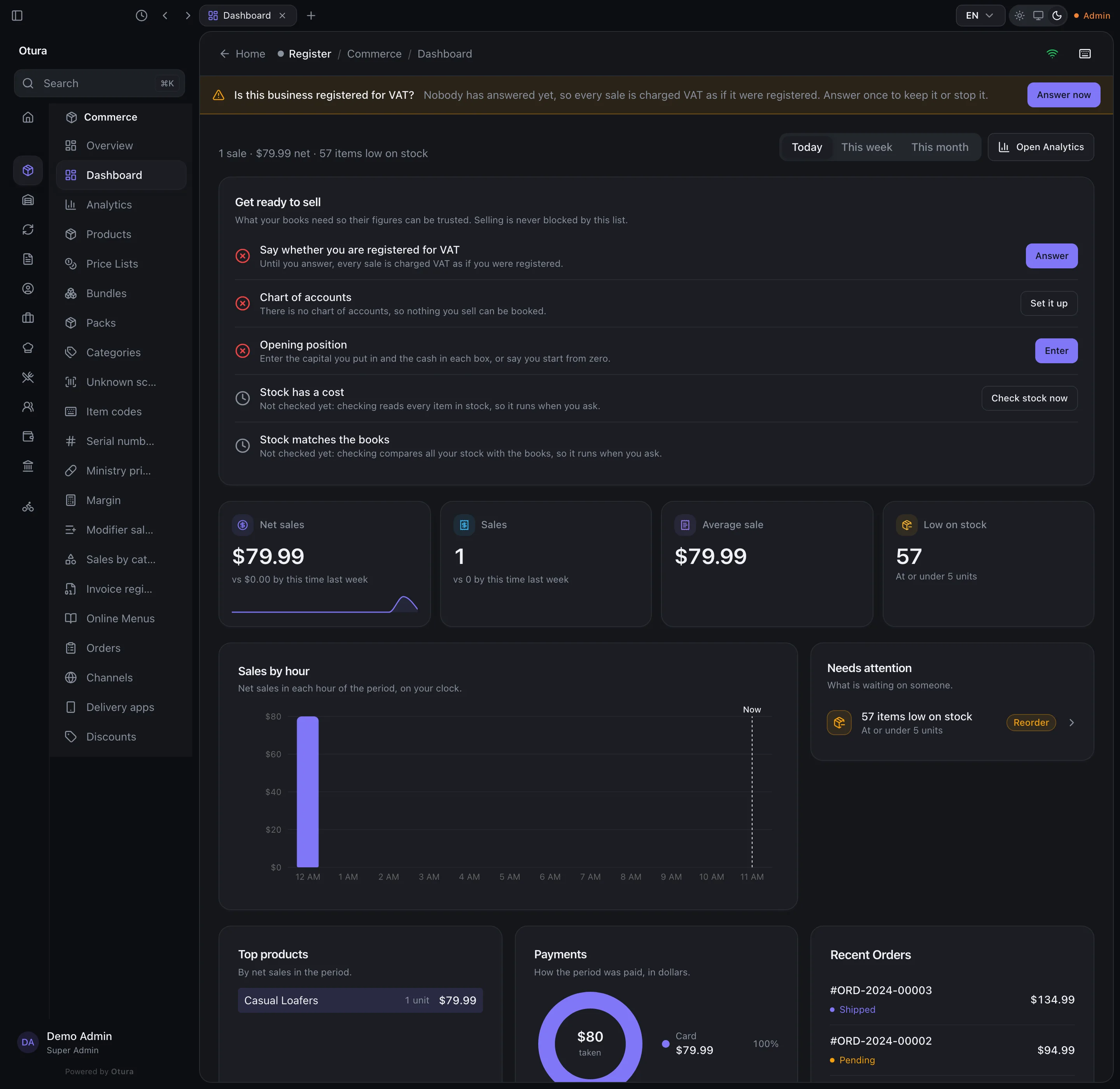
The five lines
| Line | Done when | The button opens |
|---|---|---|
| Say whether you are registered for VAT | The question is answered. Until then every sale is charged VAT as if the business were registered. | Answer: the VAT question (Is this business registered for VAT?). |
| Chart of accounts | The business has a chart. A business created now comes with one. | Set it up: the Accounting Dashboard and its Seed Chart of Accounts button (Chart of accounts). |
| Opening position | The capital and the cash are entered, or you said you start from zero (below). | Enter, then Edit until it is booked, then View. |
| Stock has a cost | No item in stock is without a cost. One that has none would sell with nothing against it in Cost of Sales. | Set costs: Inventory vs Books, which lists the stock with no cost. |
| Stock matches the books | Your stock, as the books round it, equals the inventory account to the cent. Only an exact match counts. | Reconcile: Inventory vs Books. |
The two stock lines read every item in stock, so they are not run each time the Dashboard opens: they say Not checked yet until you press Check stock now. In test mode they say After go-live instead, because going live clears the test stock and the test books.
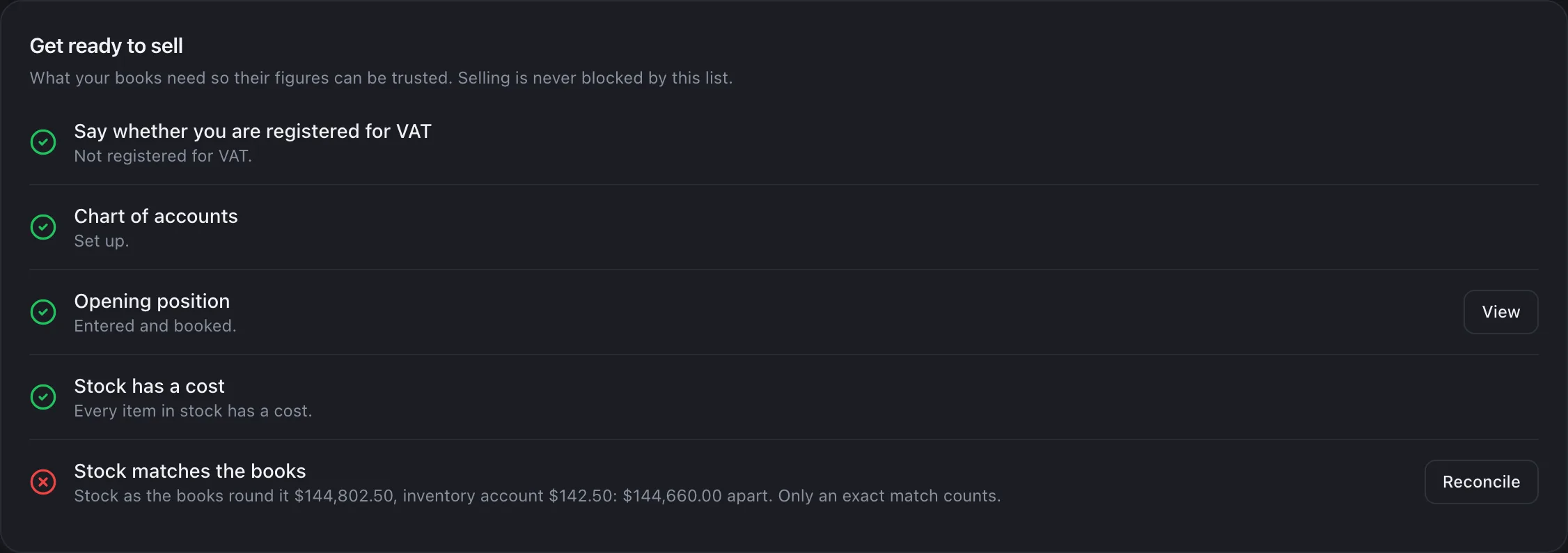
When every line is done, the card says Your books are ready. In test mode it says Your books are ready. Ask Otura to take your business live. A live business can then Dismiss it; it comes back by itself if a line goes red again. In test mode it stays, because it is where the opening position is changed until go-live.
The opening position
The opening position is what the business had on the day it started on Otura: the capital each owner or partner put in, the cash in each box, and what suppliers were owed. Without it the first balance sheet has no capital and no opening cash.
Open it
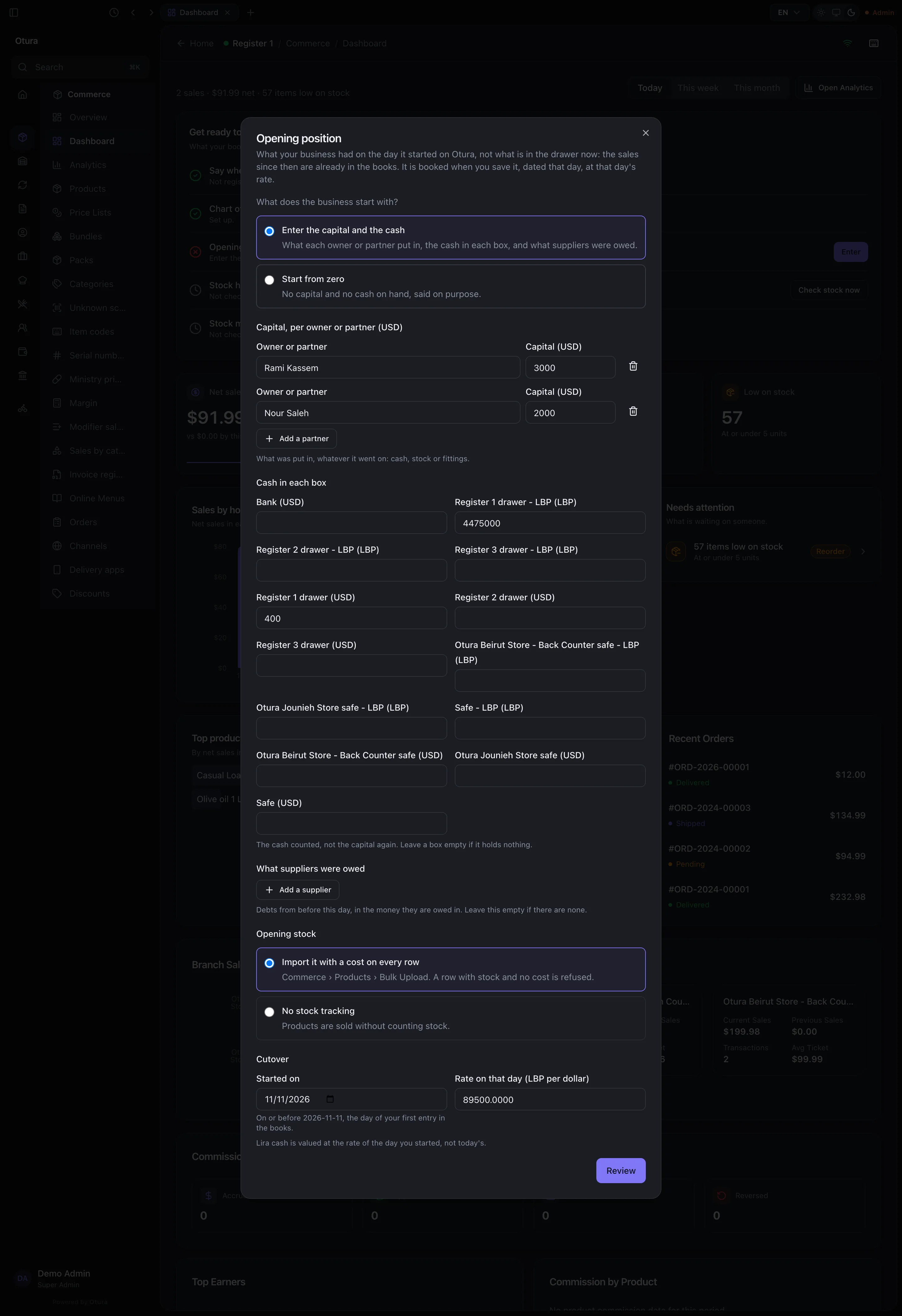
On the Opening position line, press Enter.Say what the business starts with
Choose Enter the capital and the cash, or Start from zero (no capital and no cash on hand, said on purpose; nothing is booked). Nothing is chosen for you.
Under Capital, per owner or partner (USD), give each Owner or partner and their Capital (USD): what they put in, whatever it went on, cash, stock or fittings. Add a partner adds a row. Under Cash in each box, type the cash counted in each drawer, safe or bank box, in that box's currency, and leave a box empty if it holds nothing. This is the cash, not the capital again.
Under What suppliers were owed, press Add a supplier for each debt from before that day: the Supplier, the Amount owed and its Currency, in the money the debt is owed in. Leave it empty if there are none.
Say how the opening stock comes in
Import it with a cost on every row (the Excel import, Importing products from Excel, where a row with stock and no cost is refused), or No stock tracking.A live business: the day it started
Under Cutover, Started on is the day the business started on Otura, and Rate on that day (LBP per dollar) its exchange rate. The date can be no later than your first entry in the books, and the form says which day that is (On or before …, the day of your first entry in the books); it starts on that day. The rate is filled in only for today; for an earlier day, type that day's rate, since lira cash is valued at it.
Enter what you had that day, not what is in the drawer now: the sales since then are already in the books, and counting today's cash would count them twice.
Review
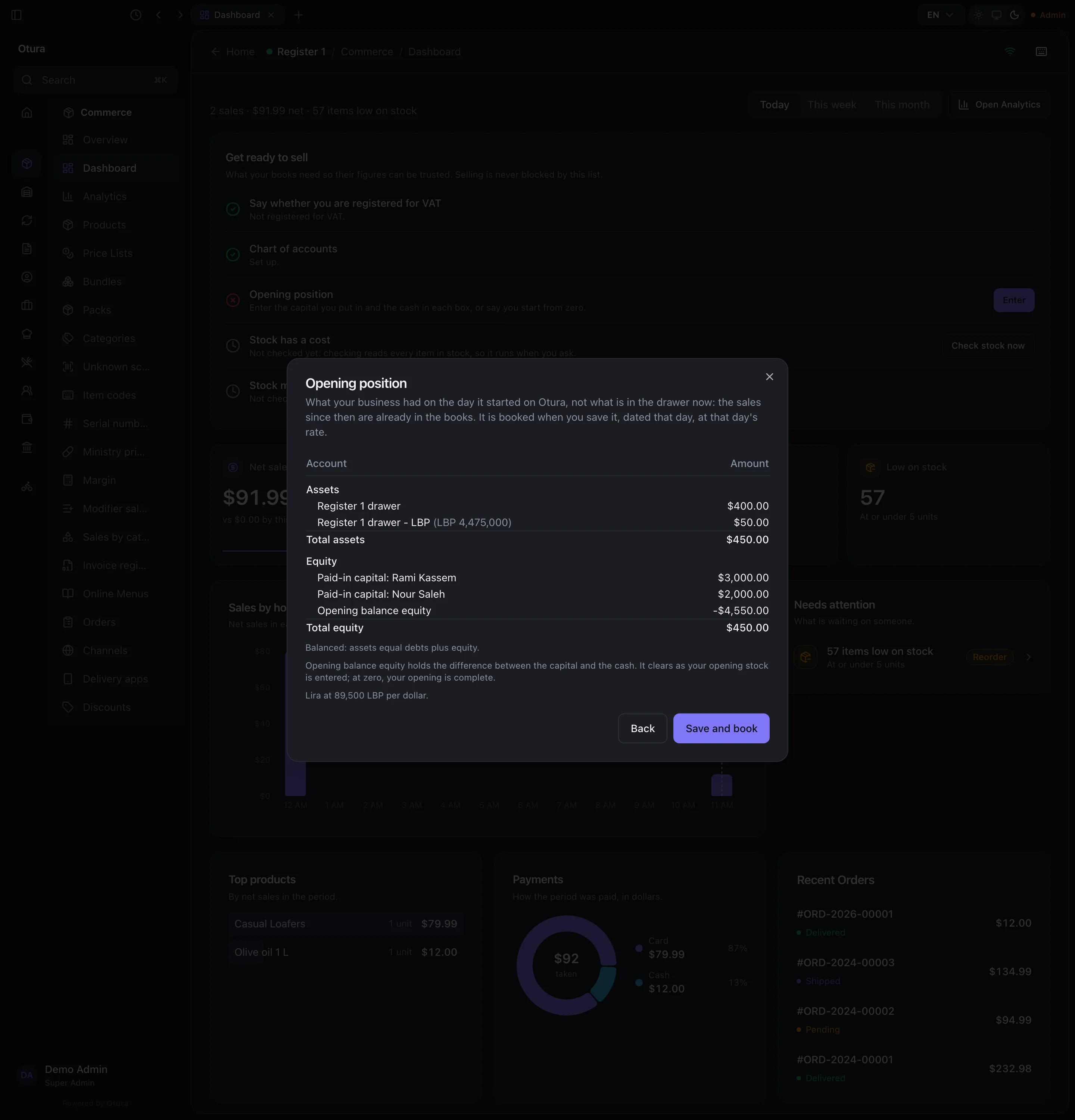
Review shows the opening balance sheet: each box under Assets, each supplier debt under Owed to suppliers, each partner's Paid-in capital under Equity, and Opening balance equity for the difference between the two. It must read Balanced: assets equal debts plus equity.
Save
In test mode, Save keeps it, and the line reads Entered. It is booked when your business goes live. It is booked on go-live day, at that day's rate, and you can edit it until then. A live business presses Save and book: it is booked at once, dated the day you gave.
What is booked
| For | Debit | Credit |
|---|---|---|
| Each partner’s capital | 1120 Opening Balance Equity | 1110 Paid-in Capital |
| The cash in each box | The box | 1120 Opening Balance Equity |
| What each supplier was owed (also an open debt on that supplier, due on the start day) | 1120 Opening Balance Equity | 4210 Accounts Payable |
| Opening stock, as it is entered with its cost | 3100 Inventory | 1120 Opening Balance Equity |
Lira cash is booked in lira and in dollars at the rate given. Opening Balance Equity holds the difference between the capital and what it became; once the cash and the opening stock are in, it should be close to zero. Once booked, the position is read-only (View): a correction is a journal entry, made by your accountant (Journal entries and periods). A business put back into test mode gets its position back to edit, and it is booked once more at go-live.
Before go-live
Otura does not take a business live from test mode until the first three lines are done: the VAT question is answered, there is a chart of accounts, and the opening position is entered (or declared zero). The two stock lines are not required, as going live clears the test stock. See Going live.