Sales invoices and credit notes
Invoice a business customer on account, with VAT and a legal number; credit them when goods come back; void an invoice issued by mistake.
Checked against the product on 13 October 2026
The till sells to whoever walks in and pays. A sales invoice is for a business customer you sell to on credit: it carries a legal number, VAT, payment terms and a due date, and what the customer owes stays on their account until they pay. A credit note takes back all or part of an invoice. Both are under SalesInvoices and SalesCredit Notes.
One number series for every invoice
Every invoice your business issues takes the next number of one series, INV-000001, INV-000002, and so on: a sales invoice here, a sale at the till, an online order. Every credit note takes the next number of a second series, CN-000001 onwards: a credit note here, a return at the till, a cancelled online order. The numbers never restart, not at the new year either, and none is skipped: an invoice that fails to post gives its number back to the next one.
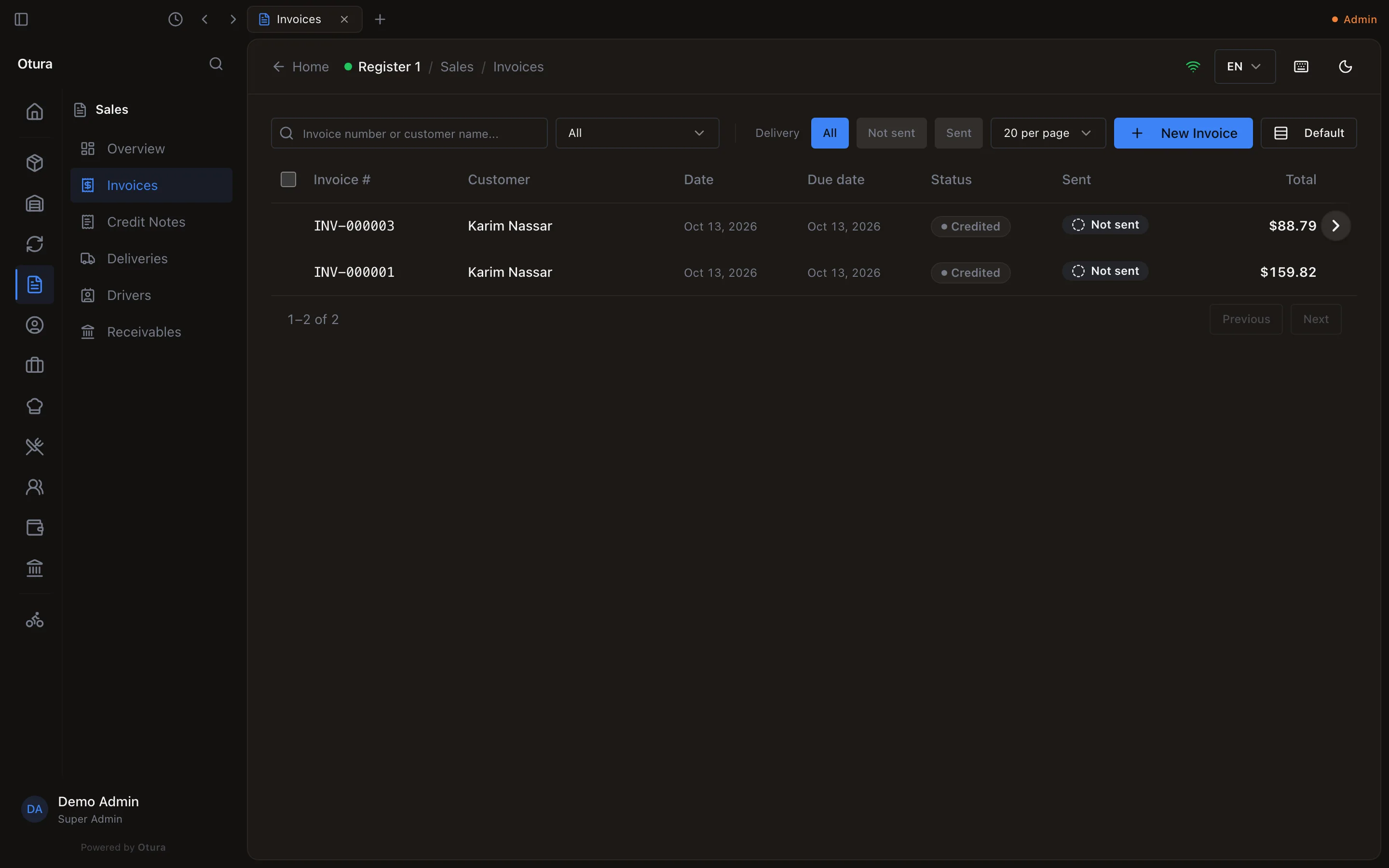
CommerceInvoice register lists them side by side, by month, by date or from one number to another, with their totals, and exports or prints them for the Ministry of Finance: see Invoice numbers and the invoice register. Below, the business invoices INV-000004 and INV-000006 sit between the till sales in the one series.
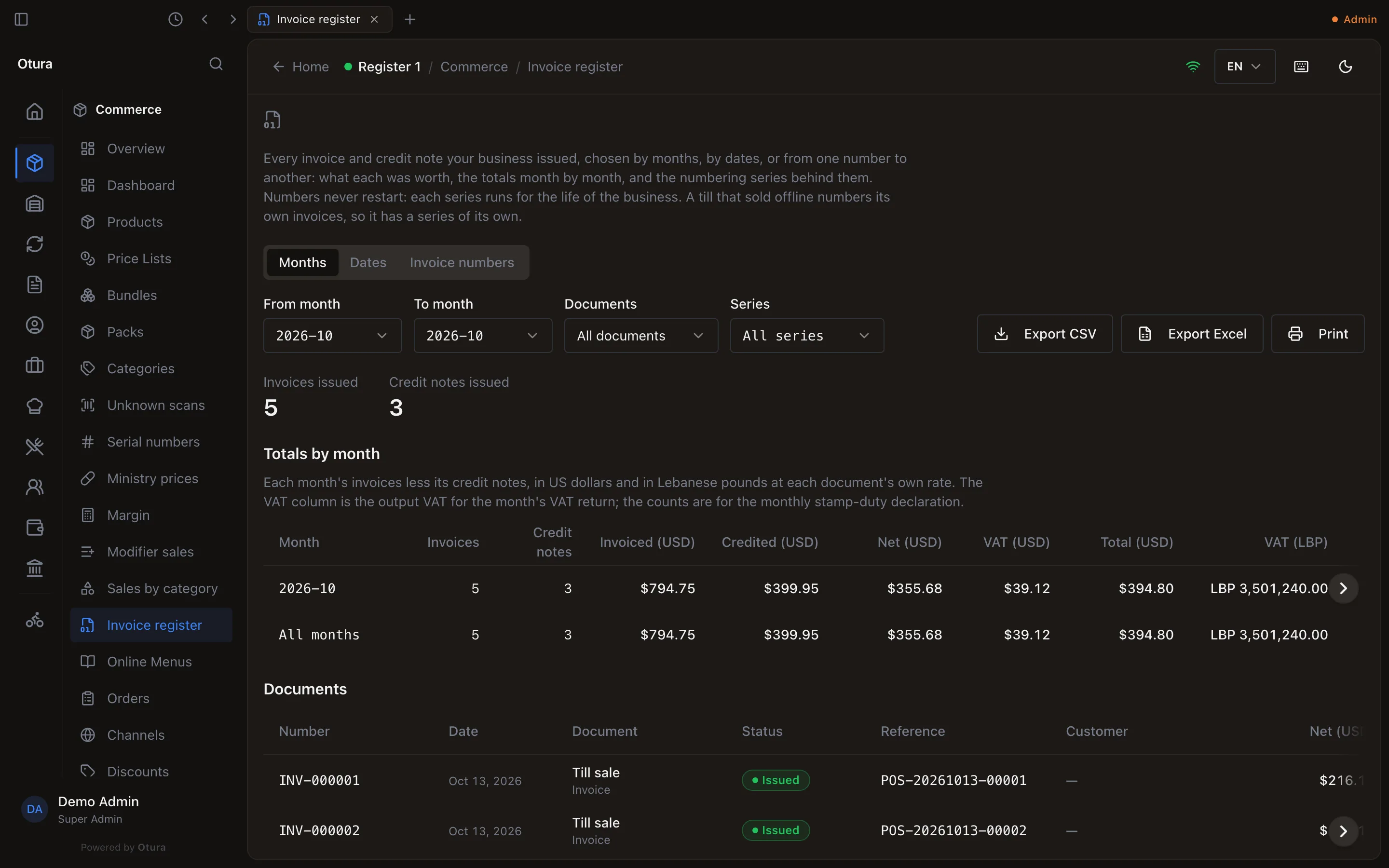
A sale a till rings while it cannot reach the server prints a provisional receipt and takes the next number of this same series when it reaches the server, so the series has no gaps and no number of a till's own.
1. Issue an invoice
Press New Invoice. The screen is Rapid sales entry: a header, then a grid you fill from the keyboard. Everything you type is saved as a draft as you go (Saved, top right); a draft has no number yet.
The customer and the header
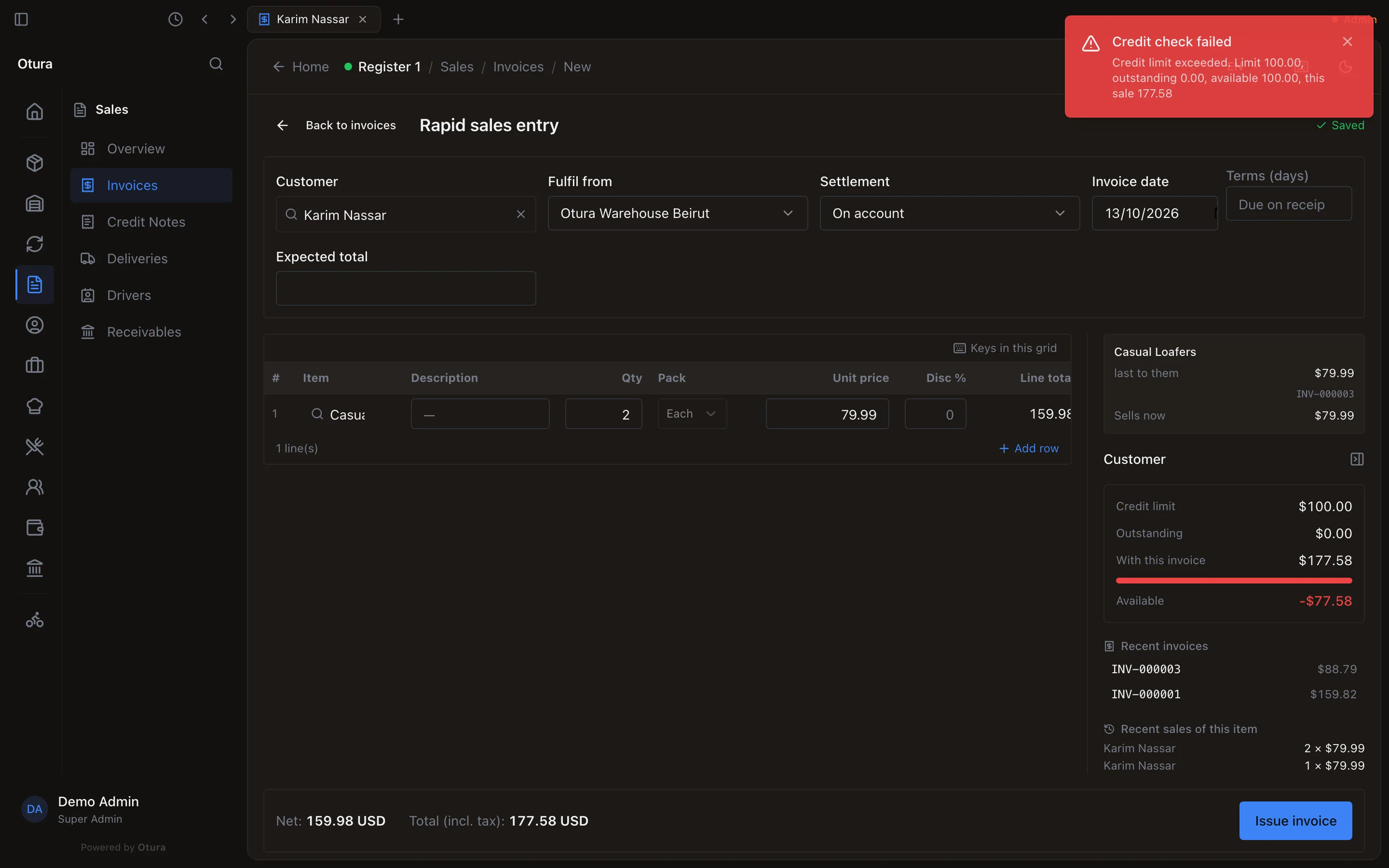
- Customer: type two letters or more and pick them. If they are not there yet, the list offers Create customer "…". Their payment terms fill in by themselves. The Customer panel on the right shows their Credit limit and what they owe now (Outstanding); while the invoice you are typing goes on account, a line With this invoice below it shows what they will owe once it is issued, and Available what is left of the limit after it.
- Fulfil from: the store or warehouse the goods leave from. Required: the stock comes out of this location.
- Settlement: On account (the default), Cash, Card or Cash on delivery.
- Invoice date (today) and Terms (days), from 0 to 365. Left blank, an invoice on account takes the business's default terms, or falls due the day it is issued.
- Expected total is optional: type the total on the paper you are copying from, and the footer shows the difference, so you know when every line is in. It is not saved to the books.
The lines
In Item, type three characters or more of the name, SKU or barcode, or scan, and pick the item. Then Qty, the Pack if it comes in packs, and Disc %. The Unit price fills in from the customer's price list; change it if you agreed another. Prices on an invoice are before VAT, in dollars. Description replaces the item's name on the invoice if you fill it.
A line counts only once it has an item, a quantity and a price above zero. The footer shows the Net and, once the draft is saved, the Total (incl. tax) worked out by the server.
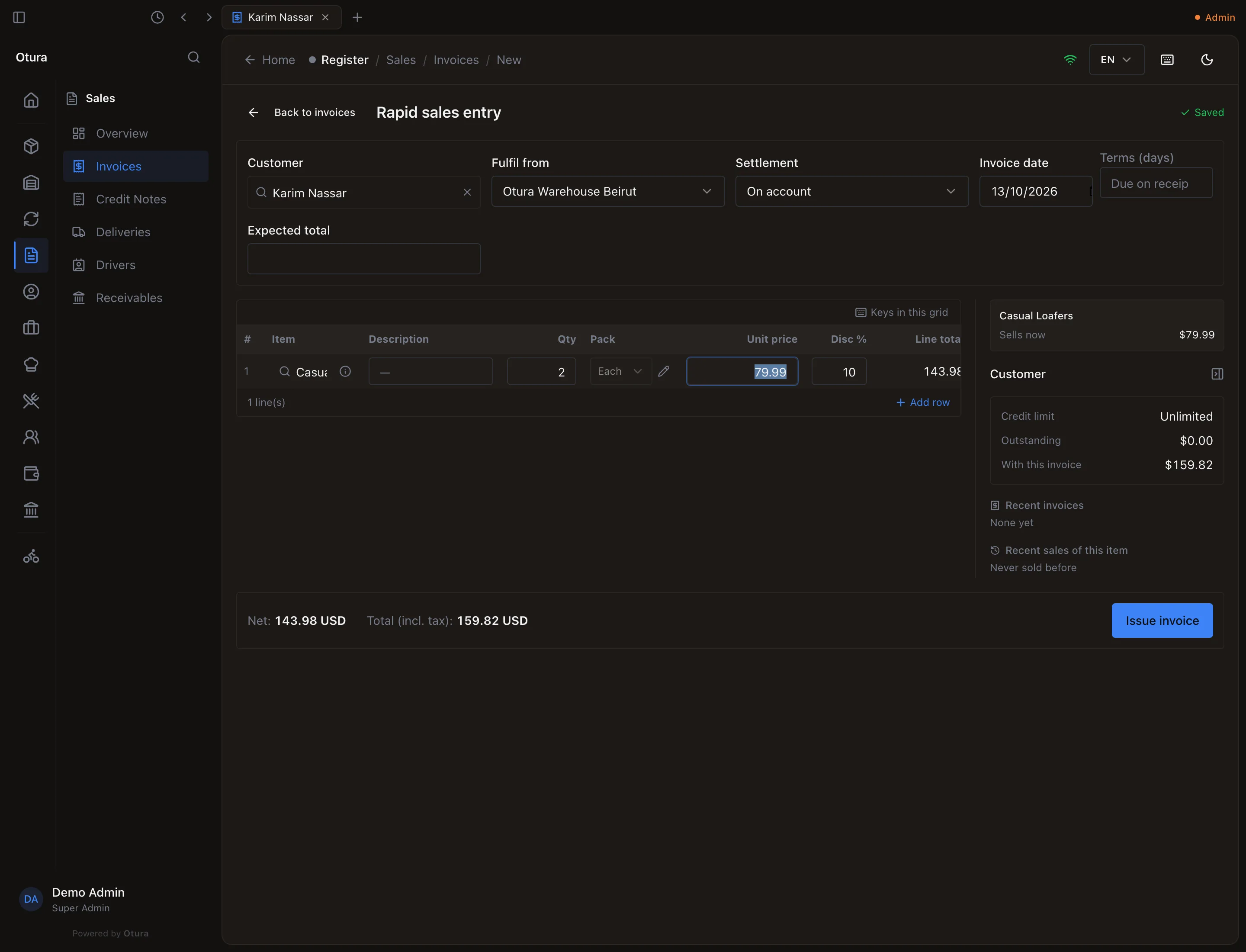
Two pairs at $79.99 less 10%: $143.98 before VAT, $159.82 with it. Issue it
Press Issue invoice (or
F9). It is available once there is a customer, a Fulfil from and at least one complete line. The confirmation names what you are about to post: Issue 1 line(s) totalling 159.82 USD to Karim Nassar? This allocates a legal number and posts the sale. For an invoice on account it also asks Is this invoice paid?: leave it off, and the balance stays on the customer. Press Issue invoice.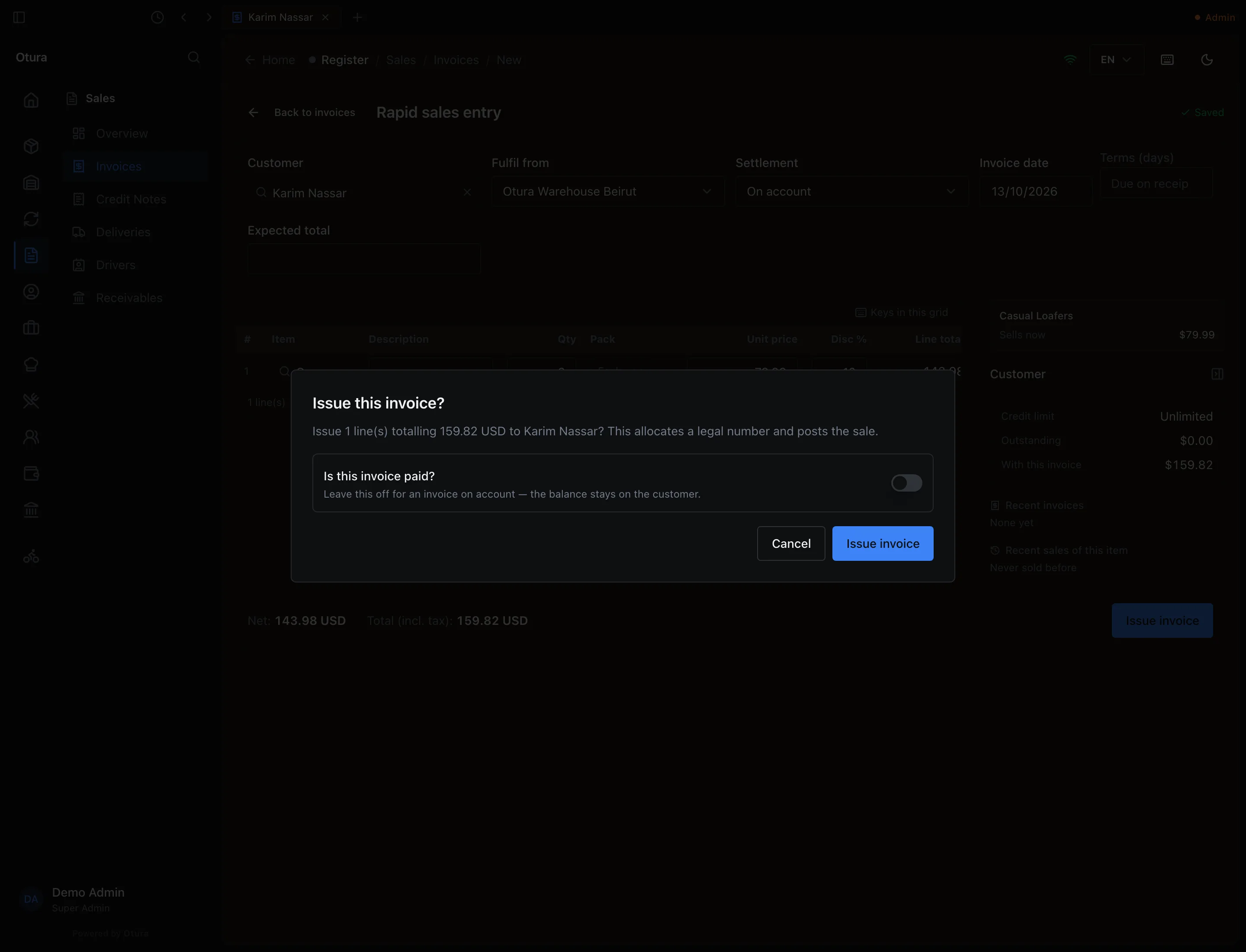
The confirmation says what will be posted, and to whom. The message Invoice INV-000001 issued. gives its number. The screen clears the lines and keeps the customer, ready for the next invoice.
Issuing can be refused:
- Not enough stock at the Fulfil from location, including stock that arrived after the invoice date: an invoice dated before the goods came in cannot take them. The message names the item and the location, for example Insufficient stock for Bottled Water 500mL at Otura Beirut Store - Main Counter. Requested: 3, Available: 0.
- The customer's credit. A customer on credit hold, with an invoice overdue beyond what the business allows, or over their credit limit, is refused, and the message says which and by how much: Credit check failed — Credit limit exceeded. Limit 100.00, outstanding 0.00, available 100.00, this sale 177.58. Nothing is posted and the invoice stays a draft. A cash or card invoice is never refused for credit. The limit is set on the customer's page (see Credit and what a customer owes).
How the totals are worked out
Each line's Net is quantity × unit price, less the discount, rounded to the cent. VAT is charged on each line's net (plus its excise, where the item carries one), rounded to the cent. The invoice's Total is the nets, the excise and the VAT. In the example: 2 × $79.99 = $159.98, less 10% is $143.98; VAT at 11% is $15.84; the total is $159.82.
What happens in the books
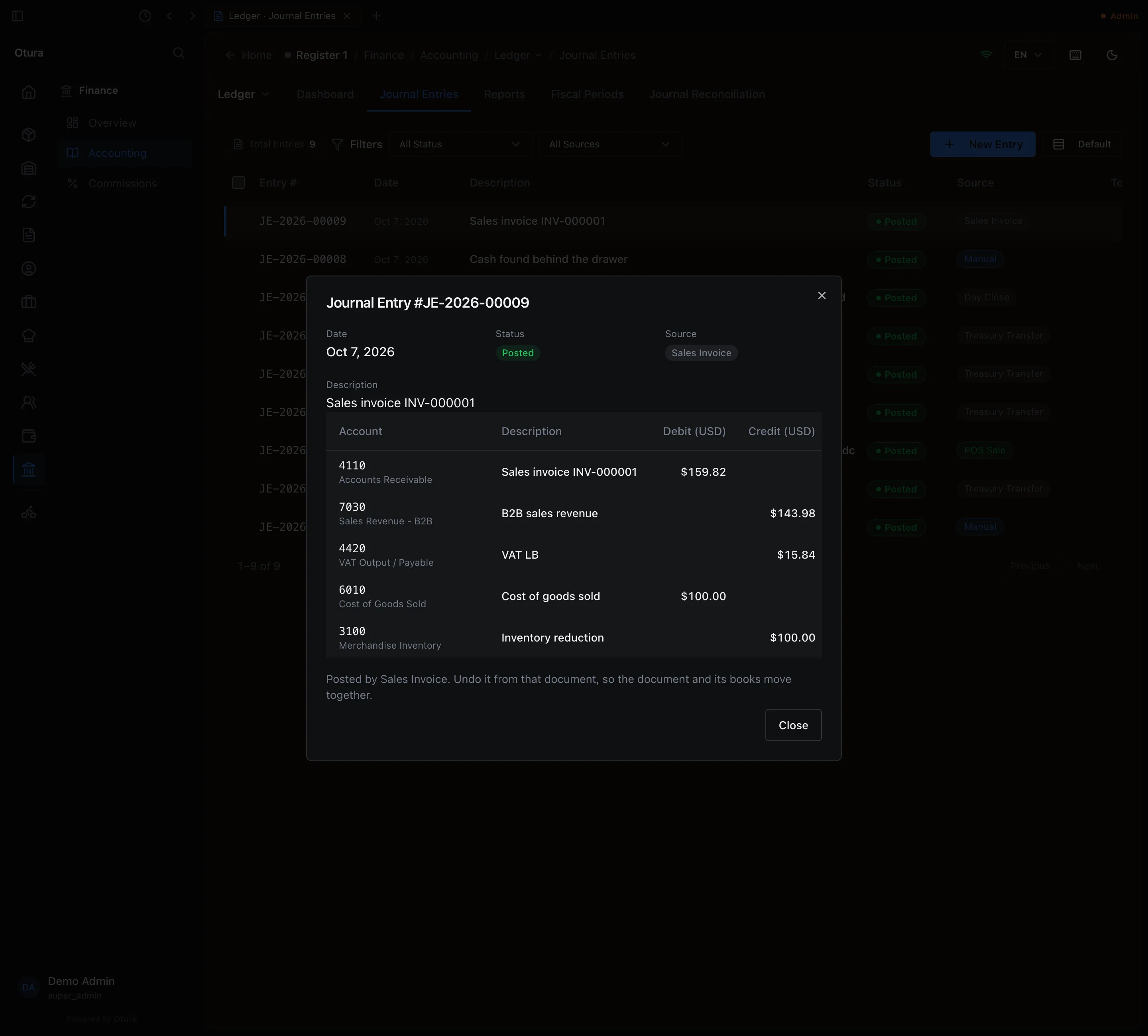
Issuing an invoice on account posts one journal entry, dated the invoice date, with the source Sales Invoice:
| Account | Debit | Credit |
|---|---|---|
| 4110 Accounts Receivable | the total ($159.82) | |
| 7030 Sales Revenue - B2B | the net ($143.98) | |
| 4420 VAT Output / Payable | the VAT ($15.84) | |
| 4450 Excise Duty Payable | the excise, if any | |
| 6010 Cost of Goods Sold | the stock’s cost ($100.00) | |
| 3100 Merchandise Inventory | the stock’s cost ($100.00) |
The cost is what the stock cost when it came in (first in, first out). A card invoice debits 5300 Card Receivable instead of 4110. The total goes on the customer's account as an open item, due on the due date. The stock leaves the Fulfil from location at once.
2. The invoice page
On SalesInvoices, open an invoice: right-click it and choose Open invoice. The page shows where it was fulfilled from, the settlement, the date, the due date and the terms; the Subtotal, Excise, VAT, Total, Paid and Balance; and the lines. A discounted invoice shows Disc. and Net columns.
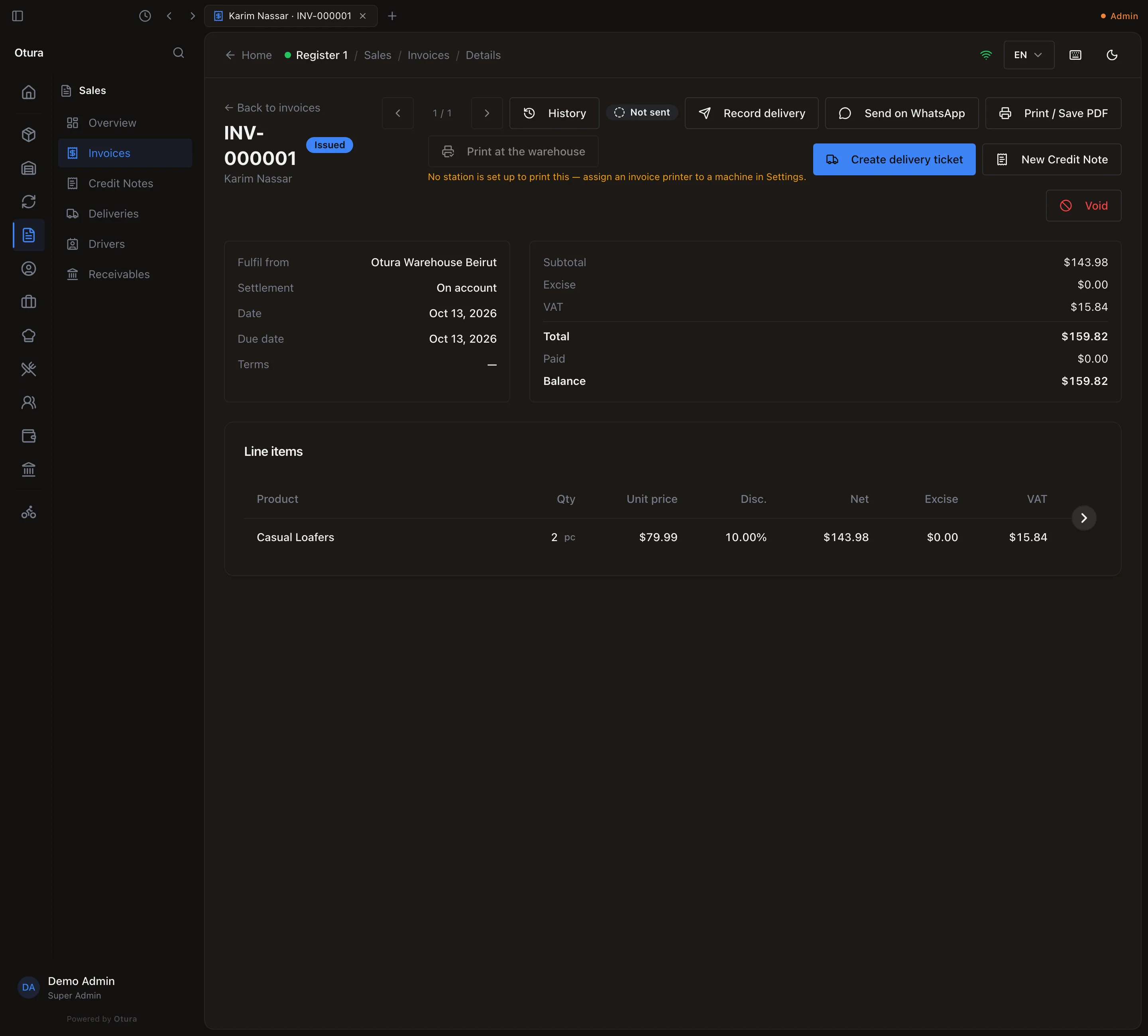
Print / Save PDF prints the invoice. In the desktop app it prints the A4 sheet: the invoice number, date, due date and who it is billed to, then a line per item with Qty, Unit price (up to four decimals), Disc. and Net when a line is discounted, an Excise column when the invoice has excise, the tax and the amount, and the totals. Print at the warehouse sends it to the machine that has an invoice printer assigned.
Payments against an invoice are recorded on SalesReceivables, which allocates a receipt across the customer's open invoices. The customer is searched by name, phone or email among all your customers. The receipt lists at most the 500 open invoices due soonest; a customer with more shows This account has more than 500 open items. Only the 500 due soonest are listed; settle them to bring the rest into view.
3. Credit a customer: the credit note
When goods come back, or the customer was charged too much, issue a credit note against the invoice. It can credit every line or part of one, and puts the goods back in stock if they came back.
Start it from the invoice
On the invoice, press New Credit Note. (From SalesCredit Notes, New Credit Note first asks which invoice, searched by number or customer.) Only an issued, partly paid or paid invoice can be credited.
Choose what comes back
Goods came back into stock is on: the cost goes back into stock at what it cost when it was sold. Turn it off to credit the money only. Under Lines to credit, type a Return quantity per line, or press Return all. A line cannot take back more than is still returnable on it: Only 2 left to return on this line. The price, discount and tax are the invoice's; they cannot be changed, and so is the exchange rate: the lira figures and the lira VAT reversed are at the invoice's rate, not today's, so they match what was declared. Add a Reason if you want.
The footer shows the Net, the VAT and the Total to be credited, worked out by the server. The VAT is at the rate in force on the Credit note date.
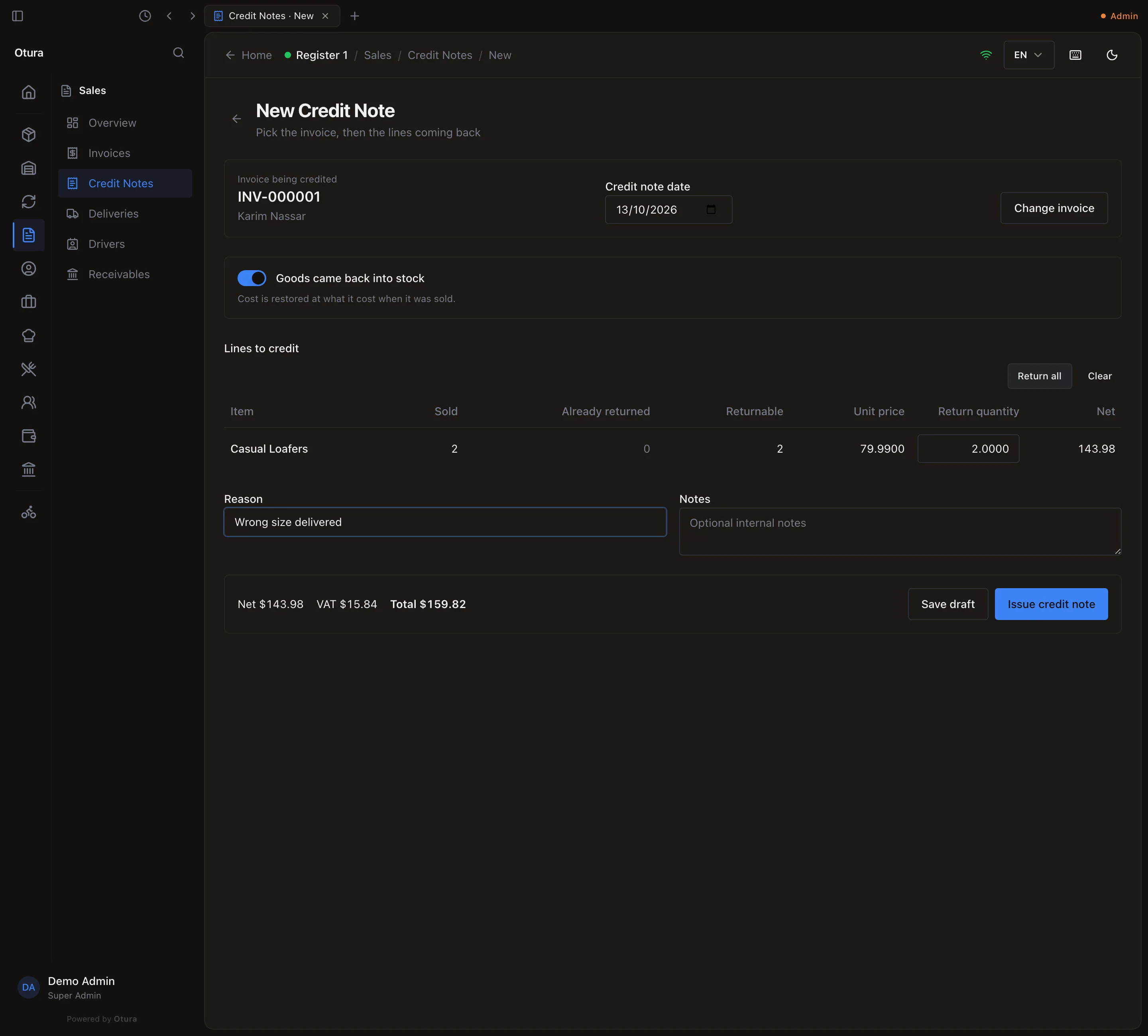
Return all: both pairs, $159.82 with VAT. Issue it
Press Issue credit note. The confirmation states what the customer is credited, VAT included: It posts to the ledger, credits $159.82 to the customer and, if the goods came back, returns the stock. It can only be undone by voiding it. Press Issue credit note. The message gives its number, Credit note CN-000001 issued. The invoice now reads Credited (Partly credited while some of it is still owed) — not Paid: no money came in.
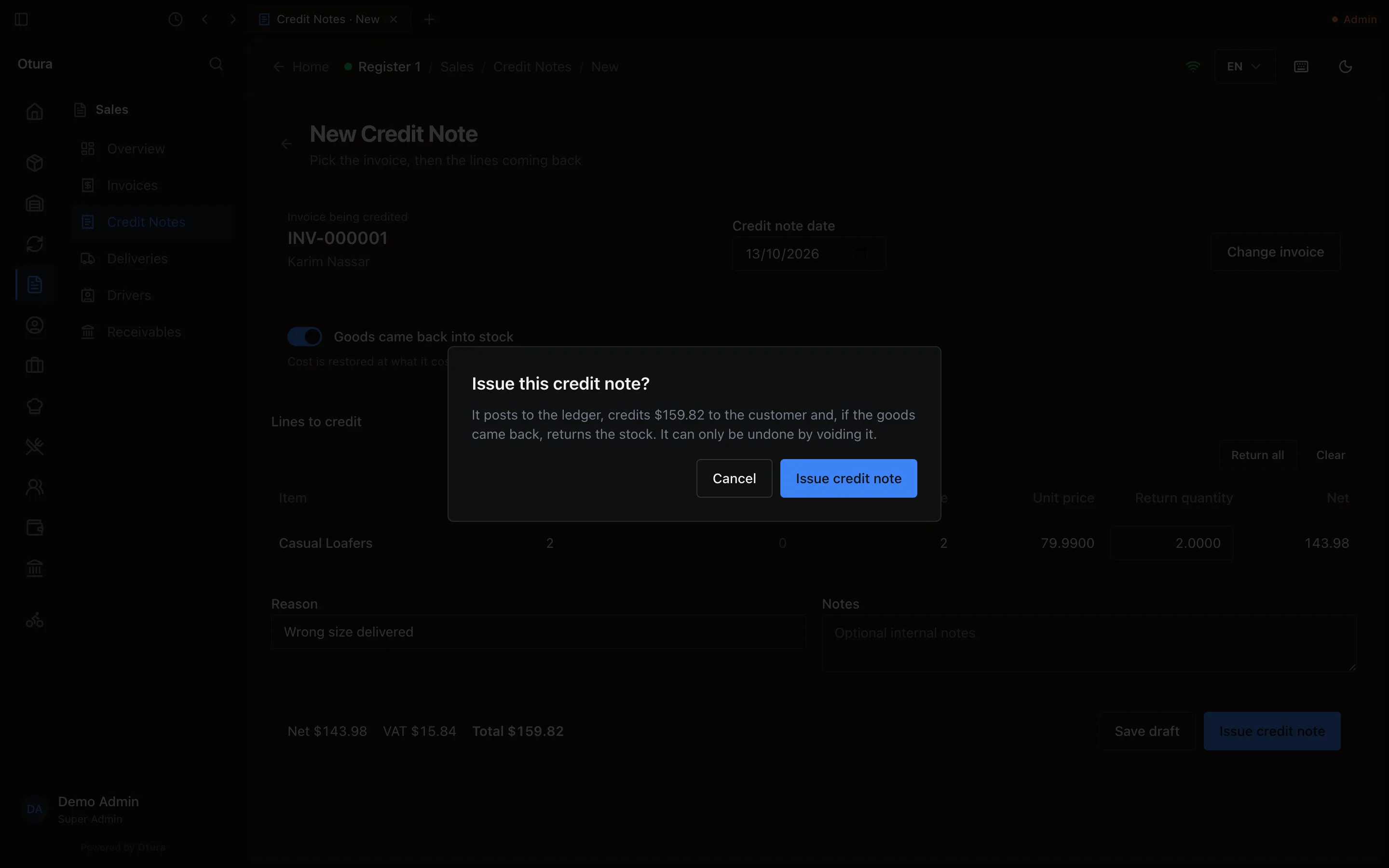
The amount credited is the footer's Total.
A credit note does not save itself as you type: use Save draft to keep one you will finish later.
What happens in the books
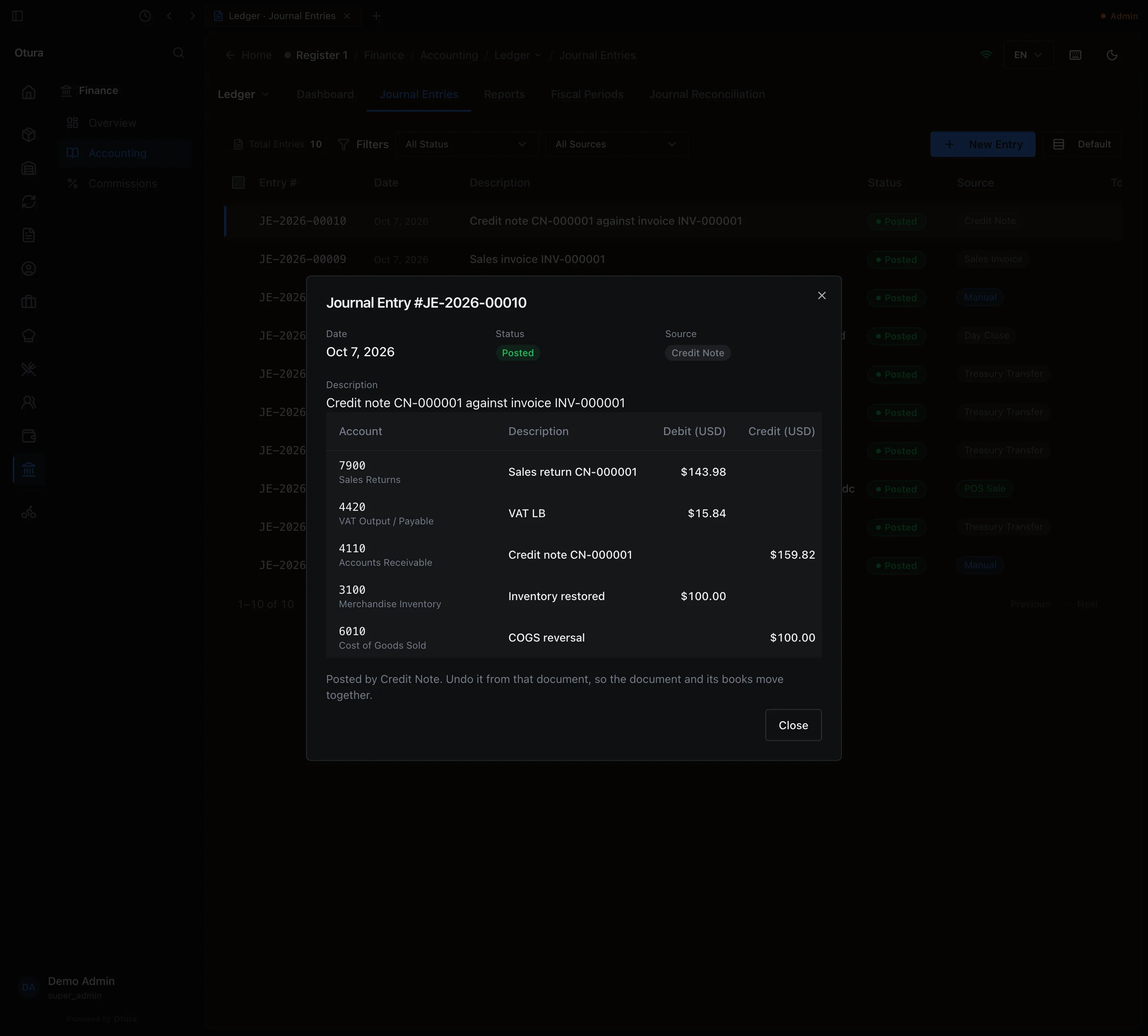
| Account | Debit | Credit |
|---|---|---|
| 7900 Sales Returns | the net ($143.98) | |
| 4420 VAT Output / Payable | the VAT ($15.84) | |
| 4450 Excise Duty Payable | the excise, if any | |
| 4110 Accounts Receivable | the total ($159.82) | |
| 3100 Merchandise Inventory (if restocked) | the cost ($100.00) | |
| 6010 Cost of Goods Sold (if restocked) | the cost ($100.00) |
The goods go back into the batches they came from, at their original cost. The VAT is taken off the VAT return of the credit note's own period. The credit is set against the invoice: what the invoice still owed is taken off it, and anything left over stays on the customer's account as a credit.
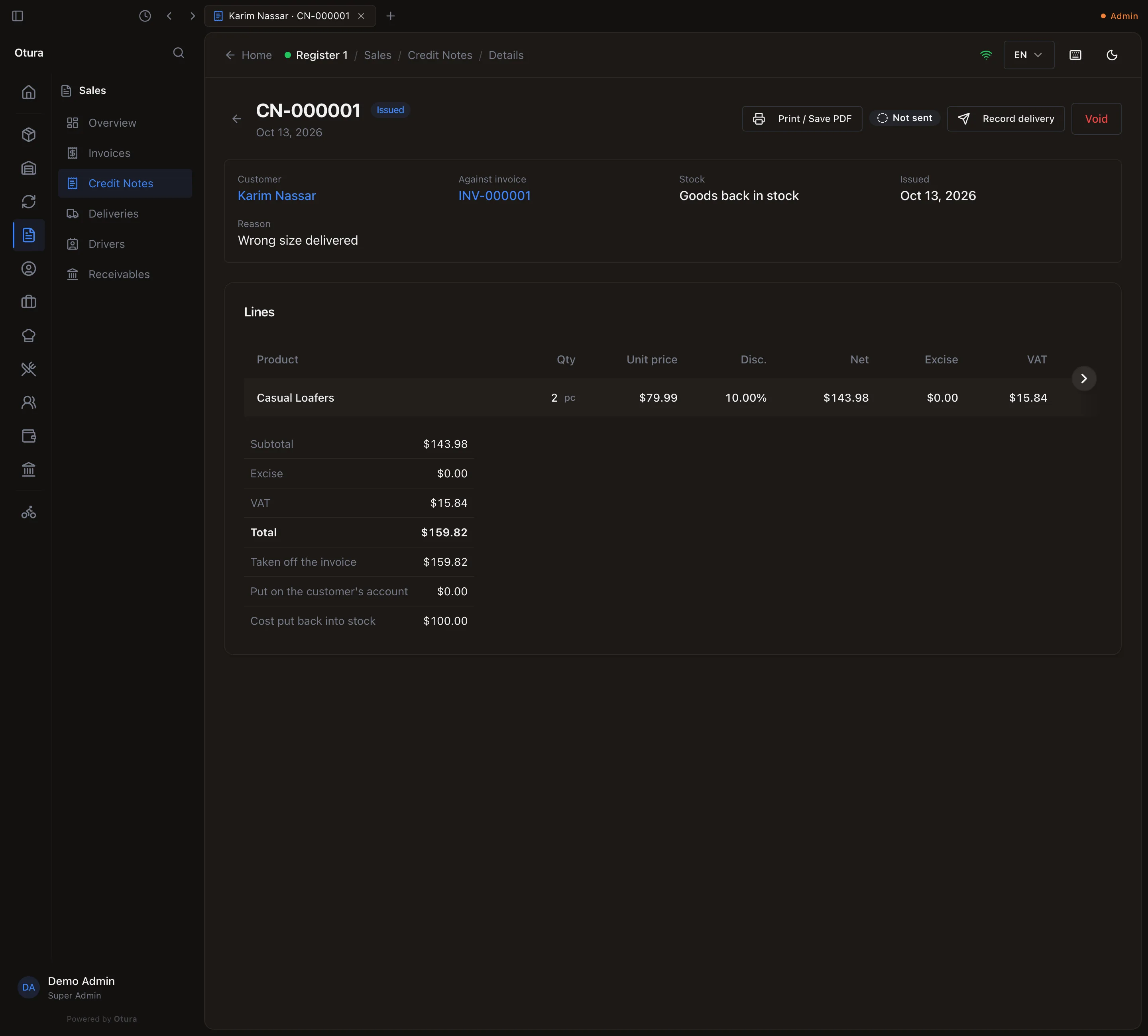
The credit note's page
Open it from SalesCredit Notes or from the invoice's Credit notes list. It shows the customer, the invoice it credits, whether the goods went back into stock, the lines and totals, and under them Taken off the invoice, Put on the customer's account and Cost put back into stock. Print / Save PDF prints a CREDIT NOTE sheet naming the invoice it credits.
Void, on an issued credit note, asks for a reason and undoes it: the journal entry is reversed, the invoice owes again what the note took off it, any credit left on the customer's account is withdrawn, and goods it put back into stock are taken out again. If those goods have been sold since, the void is refused.
4. Void an invoice
An invoice issued by mistake, with nothing paid on it and no credit note against it, can be voided. On the invoice, press Void, type the Reason (required: Void invoice stays off until there is one) and confirm.
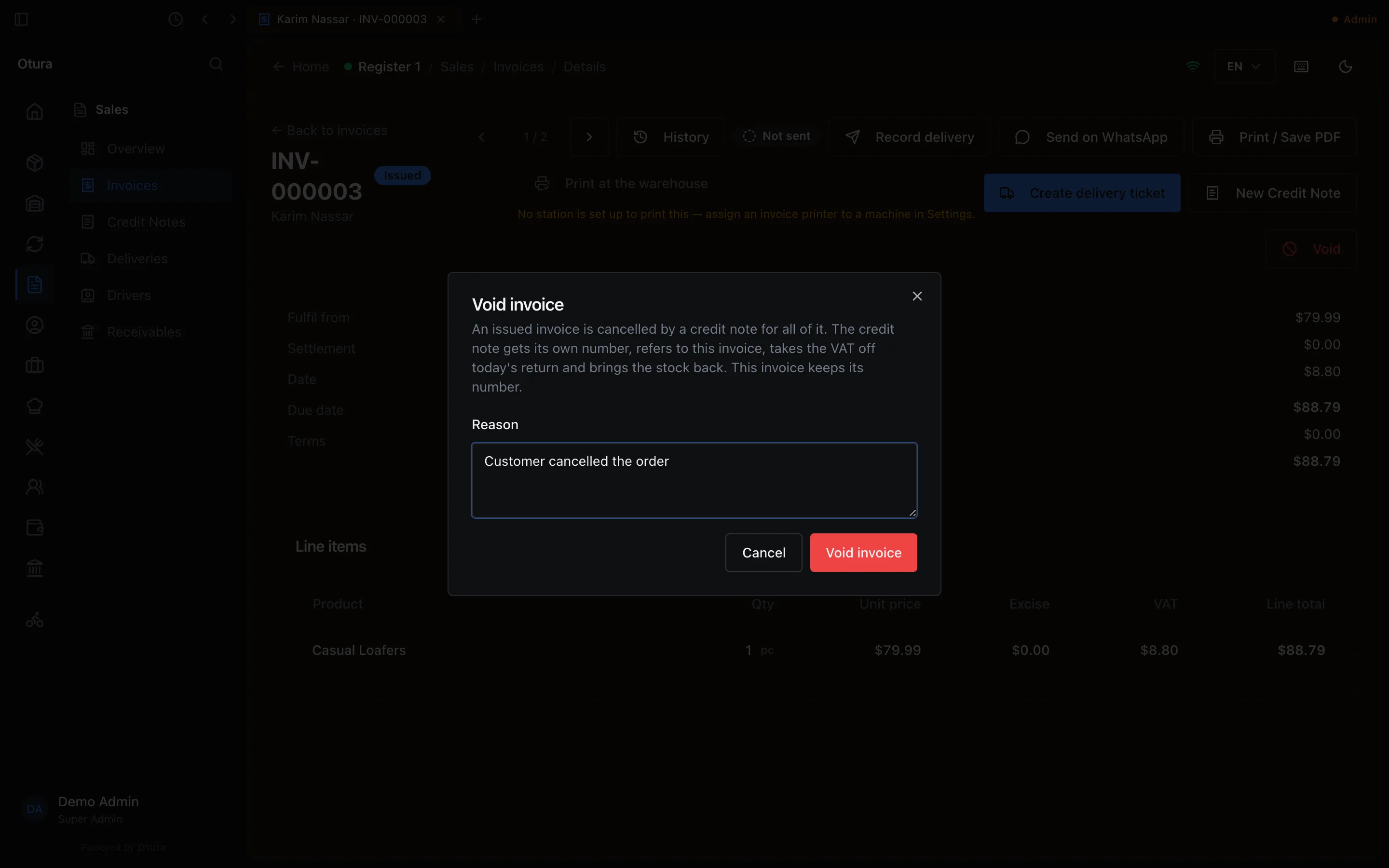
An issued invoice is a legal document the customer already has, so it is not erased: Otura issues a credit note for every unit still on it, dated today, with its own CN number and the void's reason. The message names it: Invoice cancelled by credit note CN-000002. Everything a credit note does then happens — the journal entry, the VAT taken off today's return (the invoice stays in its own period), the stock put back where it came from — and the invoice keeps its number and reads Credited, owing $0.00. Otura refuses to void:
- an invoice with money paid on it: Cannot void a settled invoice — issue a credit note instead;
- an invoice a draft or issued credit note refers to: Cannot void this invoice — credit note … references it. Void or delete the credit note first.