Invoice numbers and the invoice register
Every sale, invoice and credit note carries a legal number that never restarts. The invoice register lists them by month, by date or from one number to another, totals them for VAT and stamp duty, and exports or prints them for the Ministry of Finance.
Checked against the product on 13 October 2026
How documents are numbered
Every sale at the till, every invoice to a business customer and every online order is an invoice and takes the next number of one series: INV-000001, INV-000002, and so on. Every return, void, business credit note and cancelled online order is a credit note and takes the next number of its own series: CN-000001, CN-000002. The till and the back office share these series, so a business invoice issued between two till sales takes the number between theirs.
- Numbers never restart. Not at the new year, not when a fiscal year closes: each series runs for the life of the business. When the Ministry asks how many invoices you issued in a year, the register counts them (below). The one exception is practice invoices of a business put back into test mode (below).
- None is skipped. A sale or invoice that fails to save gives its number back to the next one.
- A number is never reused. A sale you void keeps its invoice number; the void is a credit note of its own that cancels it.
- The POS- and ORD- numbers are your own references,not the legal number. The customer's paper carries the INV or CN number.
- Numbers belong to the business, not to a branch: two branches share one series.
Where the number appears
| Where | What you see |
|---|---|
| The customer’s receipt | Invoice No. INV-000002, as large as the order number, or for a return or void Credit note No. CN-000001 with Credits invoice INV-000002. It cannot be switched off in the receipt settings. |
| History | Each row shows its INV or CN number beside the POS- reference, and the search finds a sale by either. |
| A transaction’s detail | Under the POS- reference: Invoice No. or Credit note No., and the invoice a credit note credits. |
| Returns | Type the number off the customer's receipt (INV-000002, any case) to find the sale. When the return is done, the Complete screen shows the credit note it was issued as. |
| Back-office History | The Invoice / credit note column, and its search. |
Tills that sell offline
There is one series for the whole business, offline too. A sale rung while the till is offline prints a provisional receipt numbered PRV-<date>-<number>, with no invoice number, so anyone can tell it was rung offline. When the till reconnects and the sale reaches the server, it takes the next number of the same INV series, so a sale that never arrives, or is refused, uses no number and leaves no gap. That invoice is dated when it was numbered: it prints Invoice date, the date the register lists it under, and, when the sale was rung on another day, Sale date too, the day its VAT is counted. A sale numbered the same day shows the invoice date only. Both lines always print and cannot be switched off in the receipt template. Offline selling is off until the owner switches it on in SettingsWorkspaceGeneral under Selling offline.
A business in test mode
A business trying Otura in test mode never takes these numbers. Its sales are numbered TEST-INV-000001 and its returns and voids TEST-CN-000001, every receipt says TEST — not a tax invoice, and the register lists the series as Test invoices (not tax invoices) and Test credit notes. When the business goes live they are archived and removed, and its first real invoice is INV-000001. See Trying Otura in test mode, and going live.
A business that rang practice sales on real numbers before test mode existed can be put back into test mode, if those invoices were only practice: not real sales, no customer received them, and no tax return declared them. When it goes live, those invoices and credit notes are archived and removed too, and its series start again at INV-000001 and CN-000001 (Already live with practice sales?).
The invoice register
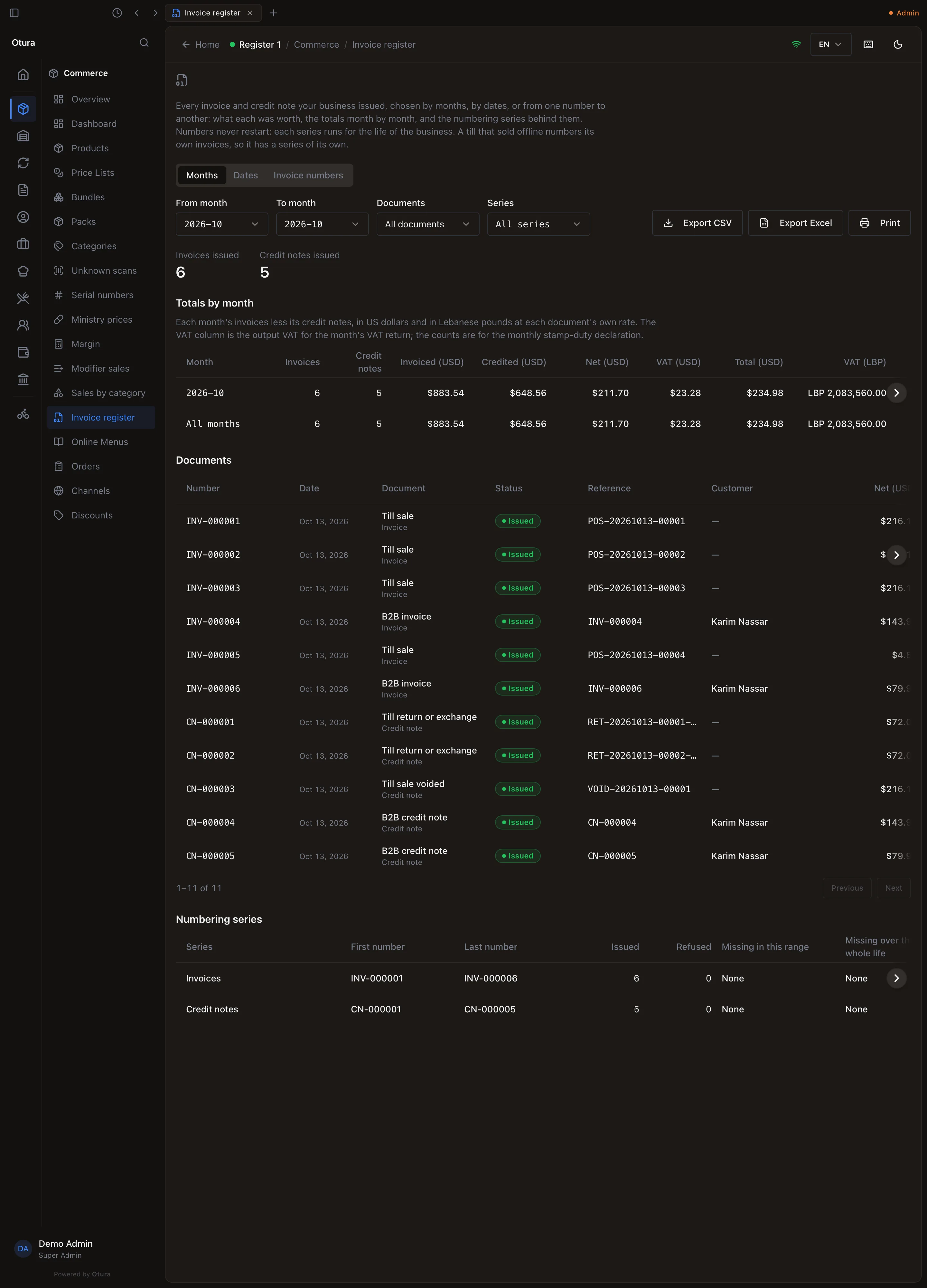
Open CommerceInvoice register. Choose the range with the three tabs at the top, then read the counts, the totals by month, the documents themselves and the numbering series.
Choose the range
- Months: a From month and a To month. Use it for the monthly stamp-duty count and the VAT period.
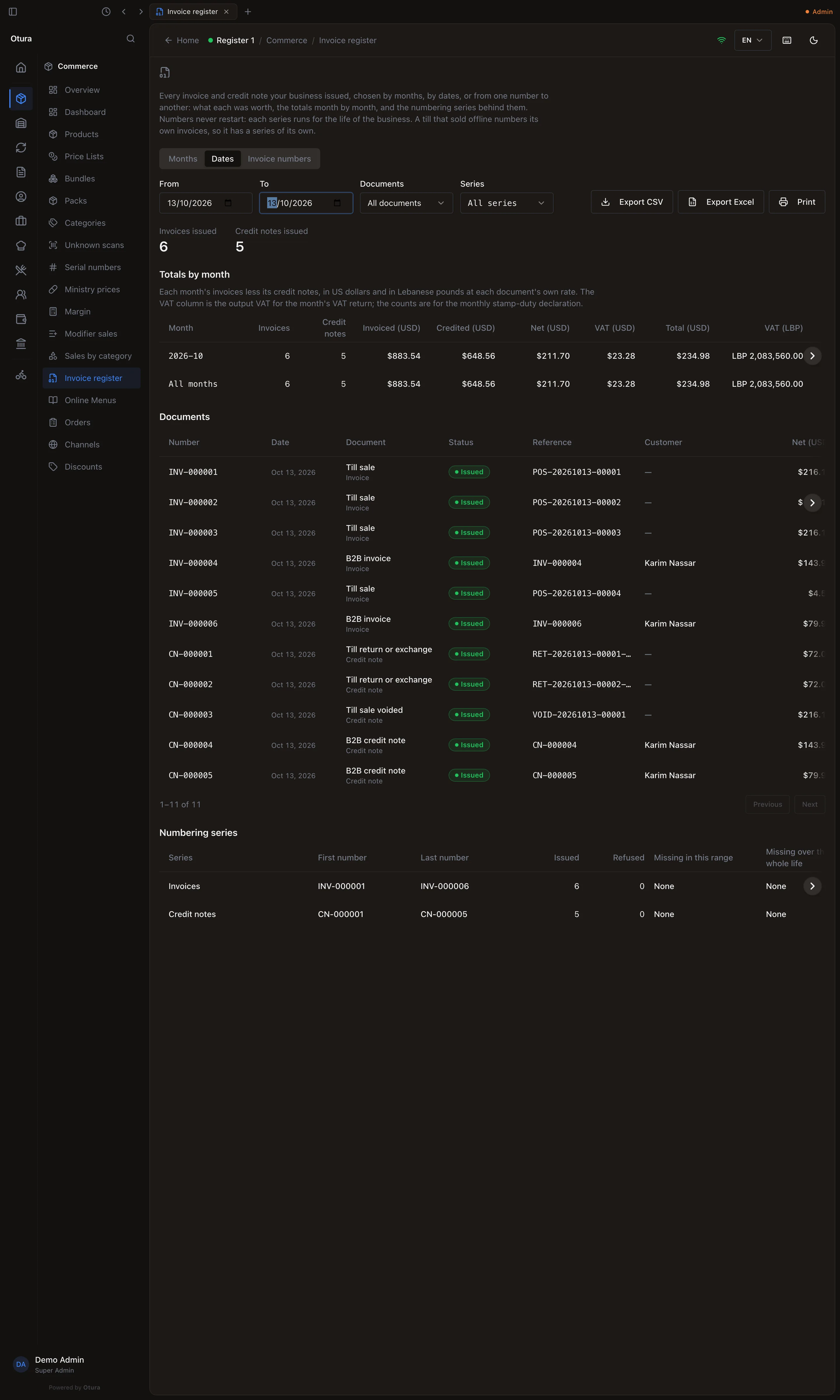
- Dates: a From and a To day.
- Invoice numbers: a From number and a To number, then Show or Enter. Both ends are included. Use it when an inspector asks for “every invoice from INV-000120 to INV-000340”. You can type the numbers loosely:
inv-120is INV-000120.
Days and months are your business's own, in Beirut time: a sale at 00:30 on the 1st belongs to the new month. Documents narrows the list to invoices or credit notes; Series appears when the range holds more than one series, INV and CN.
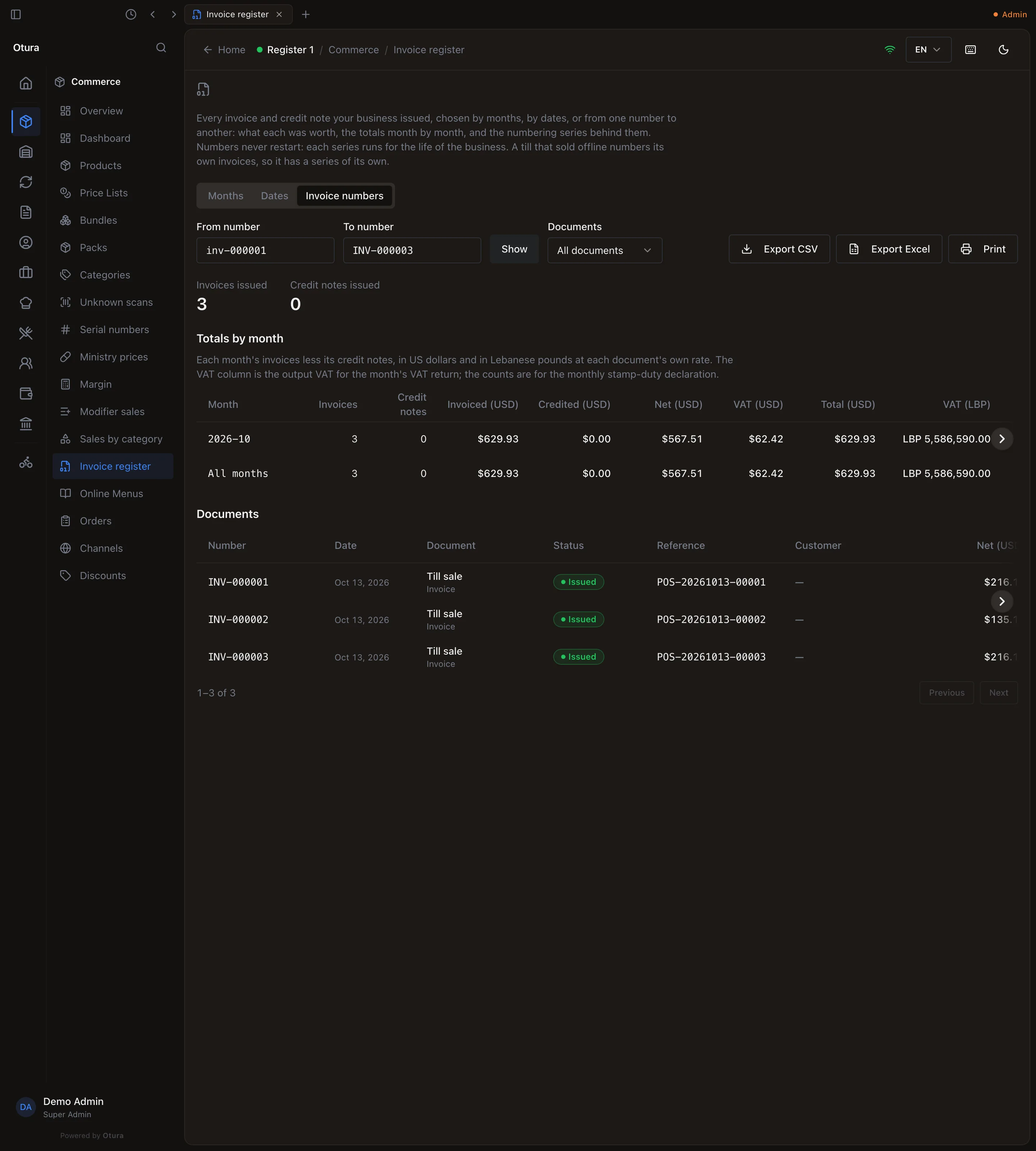
From INV-000001 to INV-000003: exactly those three. A range has to stay inside one series. If the two numbers are in different series, for example INV-000001 to CN-000001, the page says so before it looks anything up: The two numbers are in different series. A range runs within one series: INV or CN.
Read the totals by month
Totals by month has one row per month and an All months row. For each month: how many Invoices and Credit notes, what was Invoiced (USD) and Credited (USD), and after credit notes the Net (USD), VAT (USD) and Total (USD), then VAT (LBP) and Total (LBP). Lira figures use each document's own exchange rate, the one it was issued at, never today's.
For Take The monthly stamp-duty declaration The month’s Invoices and Credit notes counts. The VAT return The month's VAT (LBP) is its output VAT. It is the same figure the VAT return builds, and the same movement on VAT payable in the books. How many invoices in a year Months, January to December: the All months row. Read the documents
Documents lists every number in the range, 100 to a page: the Number, Date, the Document (Till sale, Till sale voided, Till return or exchange, B2B invoice, B2B credit note, Online order, Online order cancelled), its Status, your Reference (the POS- or ORD- number), the Customer and their tax number, the amounts in both currencies with the Rate (LBP per USD), and for a credit note the invoice it Credits.
Check the numbering series
Numbering series has a row per series (Invoices and Credit notes): its first and last number in the range, how many were issued, Missing in this range and Missing over the series' whole life. Both should read None.
Export and print
Export CSV and Export Excel save the whole range, not just the page on screen (“Preparing 1,200 of 4,000 documents…” while it runs). The Excel file has a Documents sheet and a Monthly totals sheet, with amounts as numbers you can sum; the CSV comes as a documents file and a _monthly-totals.csv, and opens with Arabic intact. The file name carries your business and the range, for example invoice-register_otura_2026-10.csv or invoice-register_otura_INV-000120_to_INV-000340.xlsx.
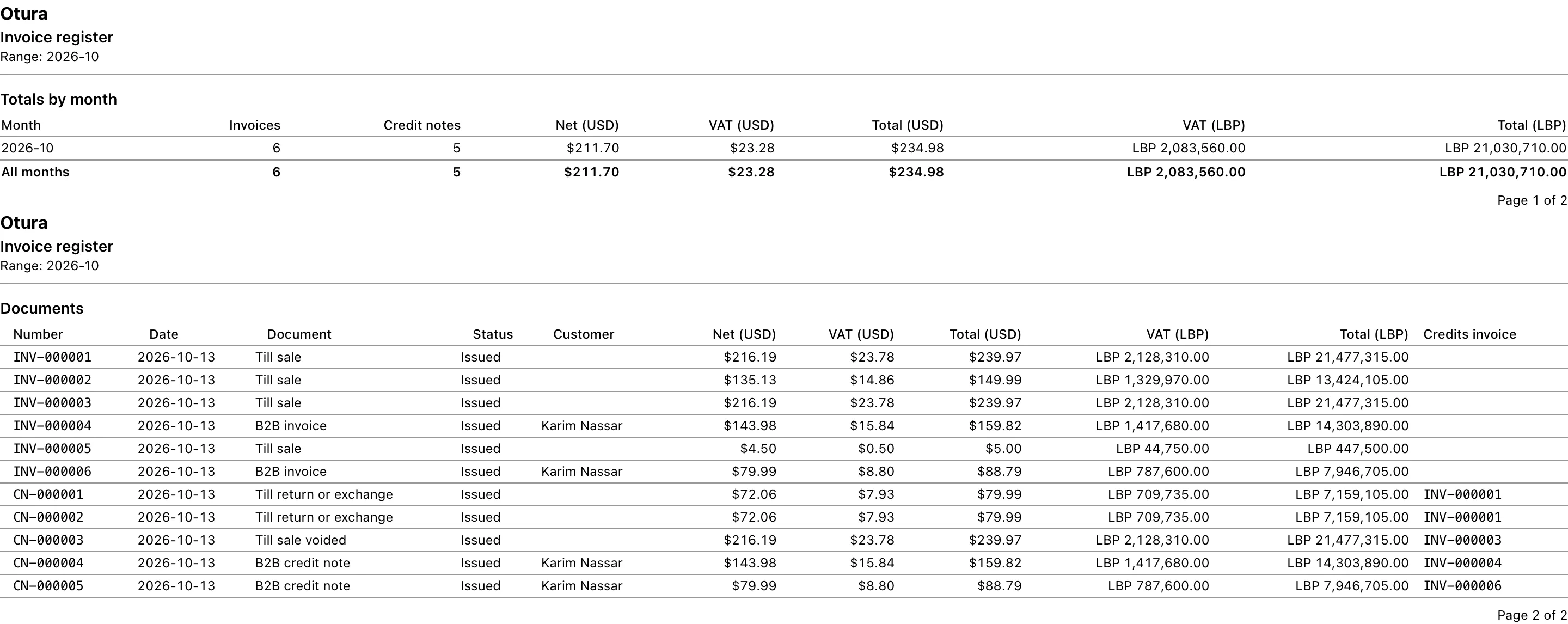
Print prints the range on A4 landscape: every sheet is headed with your business name, its tax number and the range, and numbered “Page 1 of 2”. The first sheet has the totals by month, then the documents, 30 to a sheet.
When something needs attention
| You see | It means | Do this |
|---|---|---|
| A number under Missing in this range | The server gives each number as the document is saved, so a missing number was taken and not kept. It is not an offline sale still on its way: that sale takes its number only when it reaches the server. | Find out why and keep a note of it. Never renumber invoices to close the gap. |
| Numbers out of date order | A number is dated before a lower number of the same series, usually a business invoice given a past date after later ones were numbered. | Nothing is changed for you. Check each one with your accountant. |
Limits
Related: Transaction history, Returns and exchanges, Sales invoices and credit notes, Tax returns.