Analytics: sales, products and waste over time
Net sales by day, week, month or year against the period before, the busy hours, what sold by order type, payment, category, branch and cashier, how many of each product sold in each period, and what waste cost.
Checked against the product on 23 October 2026
CommerceAnalytics shows what your tills sold over any range you choose, drawn as charts, against the period before or the same period last year. It has three tabs: Overview, Products and Waste.
The same figures as the Z report
Every figure is the one the Z report prints, added up over the range. Net sales is completed sales less returns and exchanges, at what the customer paid (tax, delivery fee and cash rounding included). Days are your business's days, in its time zone: a sale at 01:30 on the 1st is the 1st's, not the day before. Add up the Z reports of a week and you get the week's Net sales here.
- A sale that was later voided is in no figure. The Overview says how many sales rung in the range were voided, and what they came to.
- A return comes off the day, the till and the cashier it was taken back on, as on the Z report, and off the order type of the sale it reverses.
- A sale counts for the branch its till belongs to, and a product for the category it is in today.
Choosing the range
| Control | What it does |
|---|---|
| Date range | Today, Yesterday, Last 7 days, Last 30 days, This week, Last week, This month, Last month, This quarter, Last 12 months, This year, Last year, or Custom range (From and To). A preset shows the days it covers beside it. |
| Show by | Day, Week, Month or Year: one bar per period. Automatic picks days up to a month, weeks up to six months, months up to two years, and years beyond. A choice that would draw more than 400 bars is greyed out. |
| Compare with | Previous period, Same period last year, or No comparison. |
| Branch | One branch, or all. Shown when more than one branch sold in the range. |
| Order type | Dine-in, Takeaway, Delivery and the others, or No order type for sales rung without one. Overview and Products only. |
| Cashier | Who rang the sale. Overview and Products only. |
Previous period follows the range: This week so far is compared with last week's same days, This month so far with last month to the same date, Last month with the whole month before, Last 12 months and This year with the twelve months before. Last 7 and Last 30 days, and a custom range, are compared with the same number of days just before them.
Everything you choose stays in the address bar, so a view survives a refresh and you can send the link to someone with the same access.
Overview
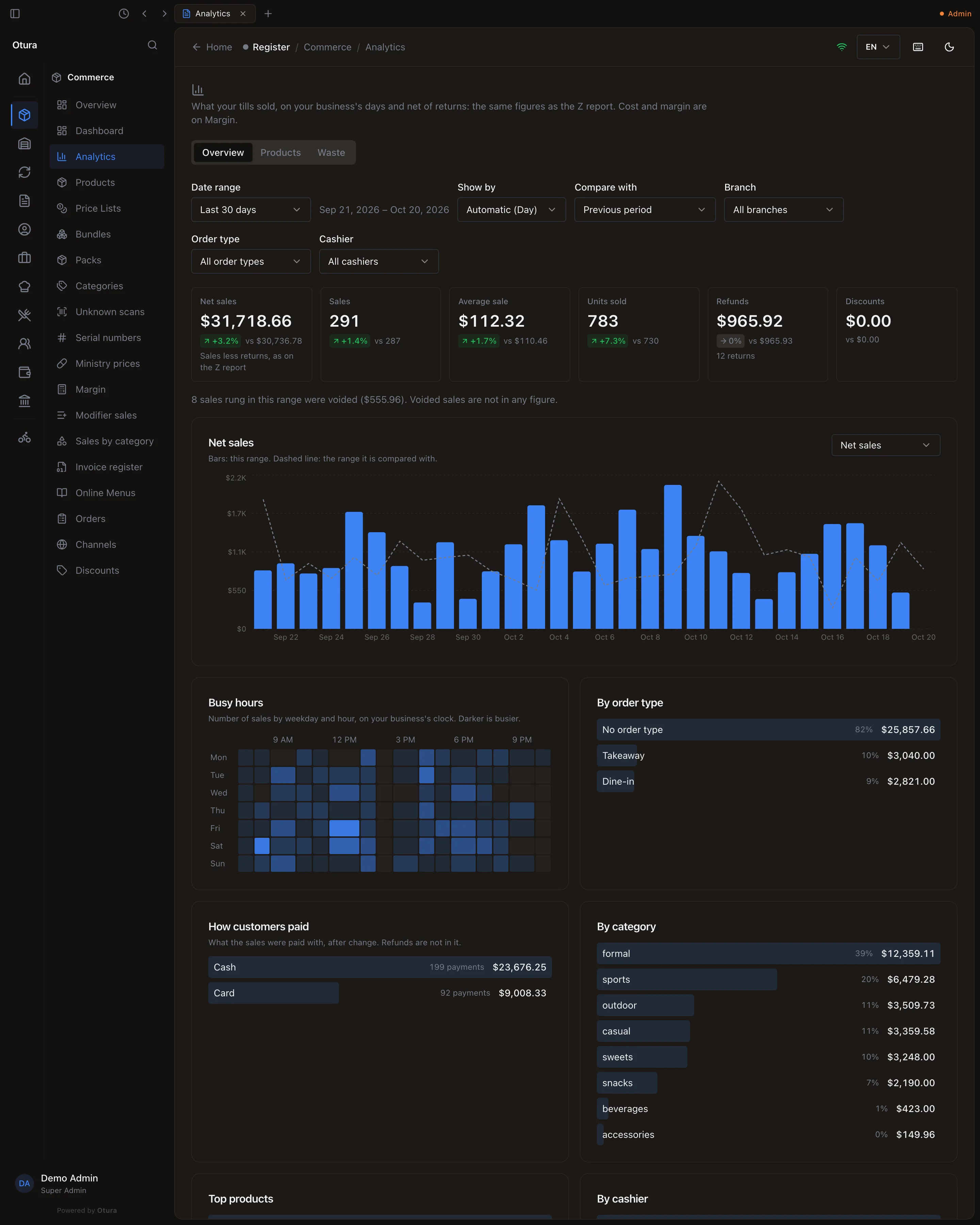
| Figure | What it counts |
|---|---|
| Net sales | Completed sales less returns and exchanges: the Z report’s Net Sales, over the range. |
| Sales | How many sales were completed. A return is not a sale. |
| Average sale | The sales’ total before returns, divided by how many there were: the Z report’s average. |
| Units sold | Units of every product, less units returned. A pack of 6 counts 6; half a kilo counts 0.5. |
| Refunds | What returns and exchanges gave back, and how many there were. |
| Discounts | What discounts took off the completed sales. |
Under each figure, the change against the compared period, with an arrow and a sign: green when it moved the good way (up for sales, down for refunds and discounts), red when it did not. When the compared period had nothing, there is no percentage to give, so only its figure is shown.
- Net sales (the chart): switch it to Sales or Average sale with the box on the right. Hover a bar for its figure, the figure of the compared days that stand for it (it names them), and the change. A week bar that holds only two days of the range is compared with two days, not a whole week.
- Busy hours: how many sales were rung in each hour of each weekday, on your business's clock. Darker is busier.
- By order type, How customers paid, By category, Top products, By cashier and, with more than one branch, By branch. Each shows its share of net sales.
A row of By order type, By cashier or By branch is a filter: choose Takeaway and every figure on the page narrows to takeaway sales. Clear filters undoes it. A category or a product opens the Products tab on it.
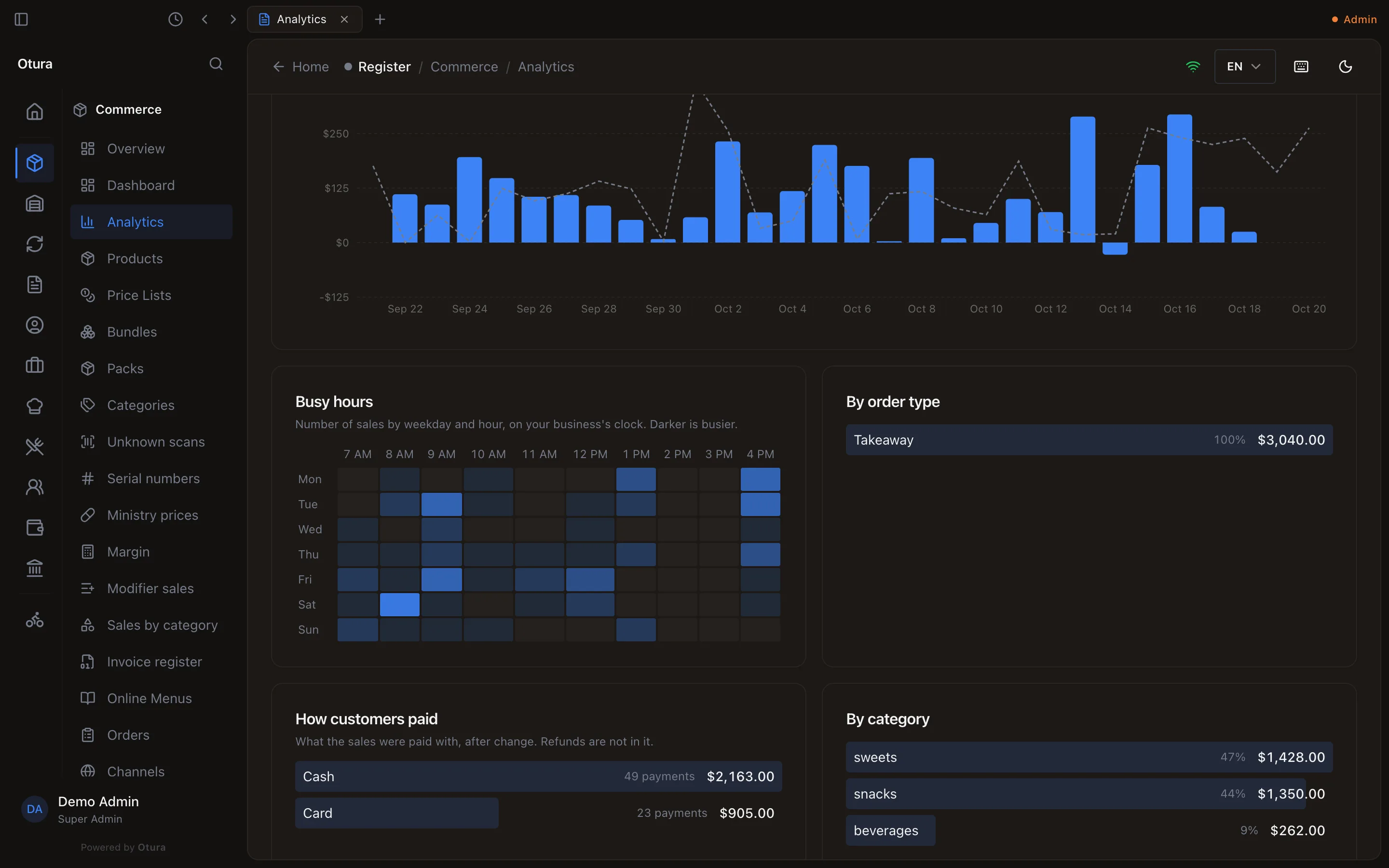
How customers paid is what the sales were paid with, after change, by method and currency. Refunds are not in it, so it adds up to the sales before returns, not to net sales.
Products: how many of each sold
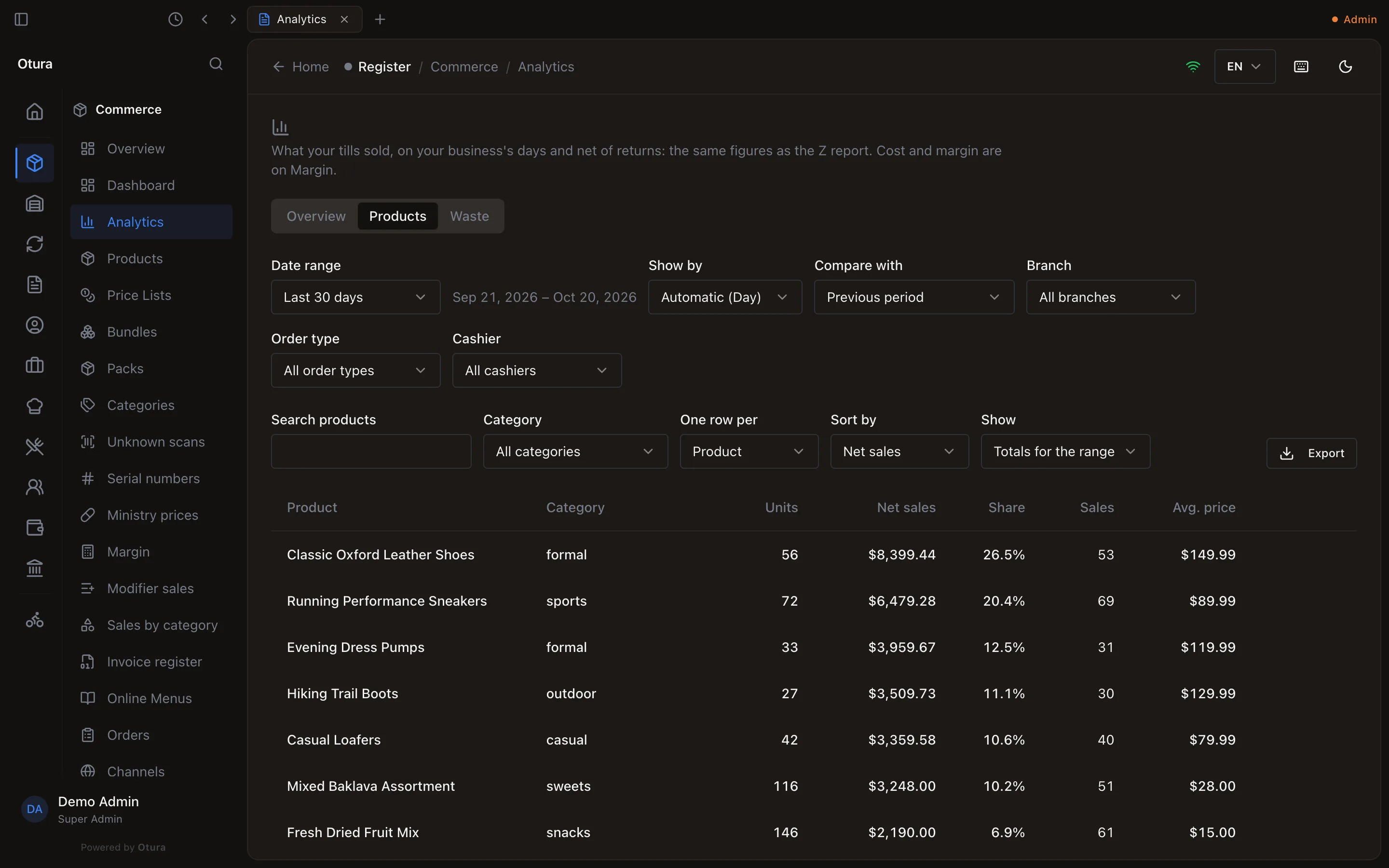
One row per product, or per variant with One row per set to Variant (a Large and a Small pizza are two rows). Units and Net sales are less returns; Sales is how many sales it was on; Avg. price is net sales over units, so discounts bring it down. Search, narrow by Category, and sort by Net sales or Units.
Under the list, Products total adds the rows up, and Net sales (as on the Z report) is the till's. Between them is what sales took on no product: cash rounding, delivery fees, and tax when your prices are before tax.
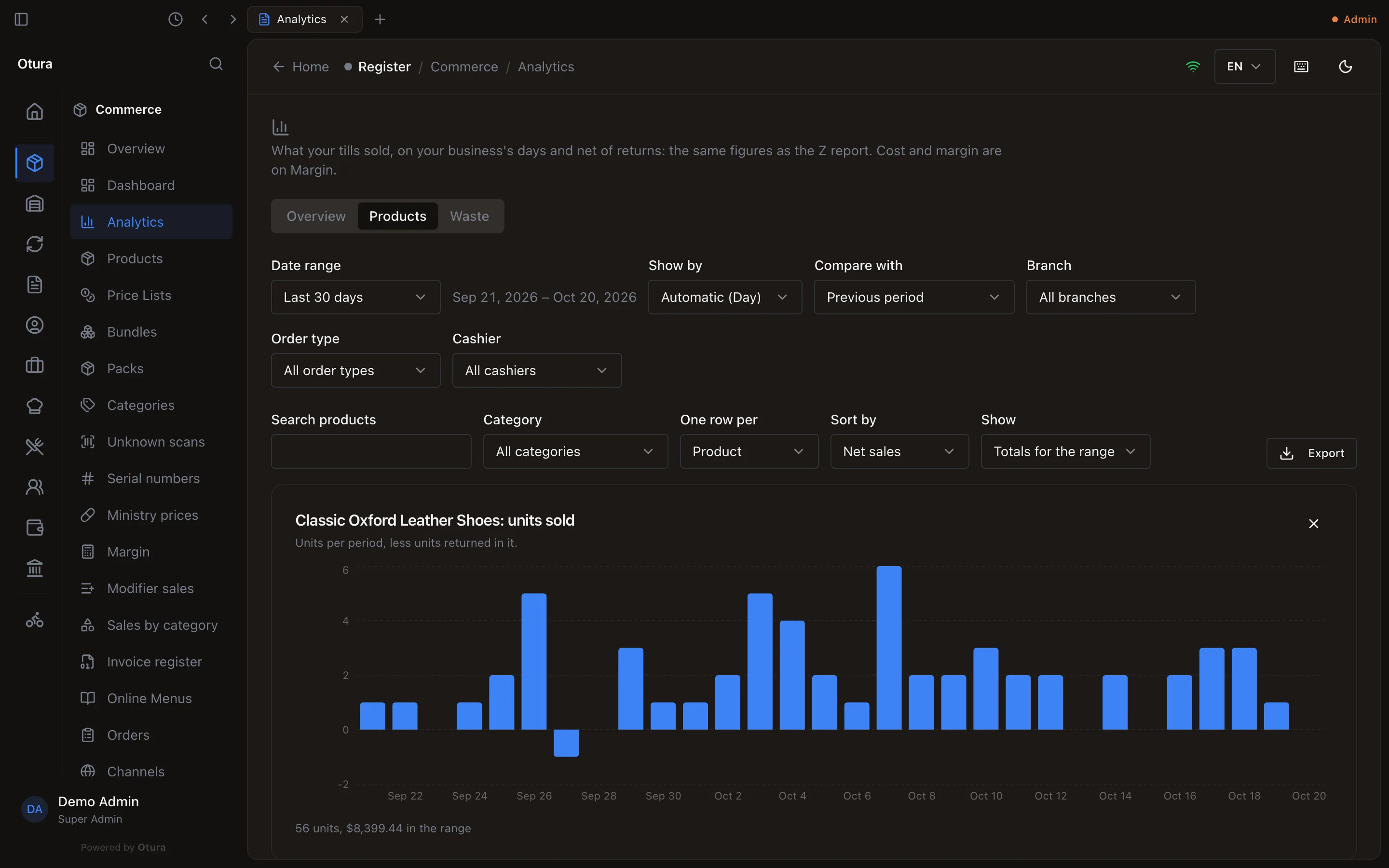
Trend on a row opens that product's units sold in each day, week, month or year of the range (Show by), with a returned unit taken off the period it came back in.
Show › Units by day (or week, month, year, following Show by) puts the periods side by side, one column each, most units first: how many shawarmas each day this week, or each month this year.
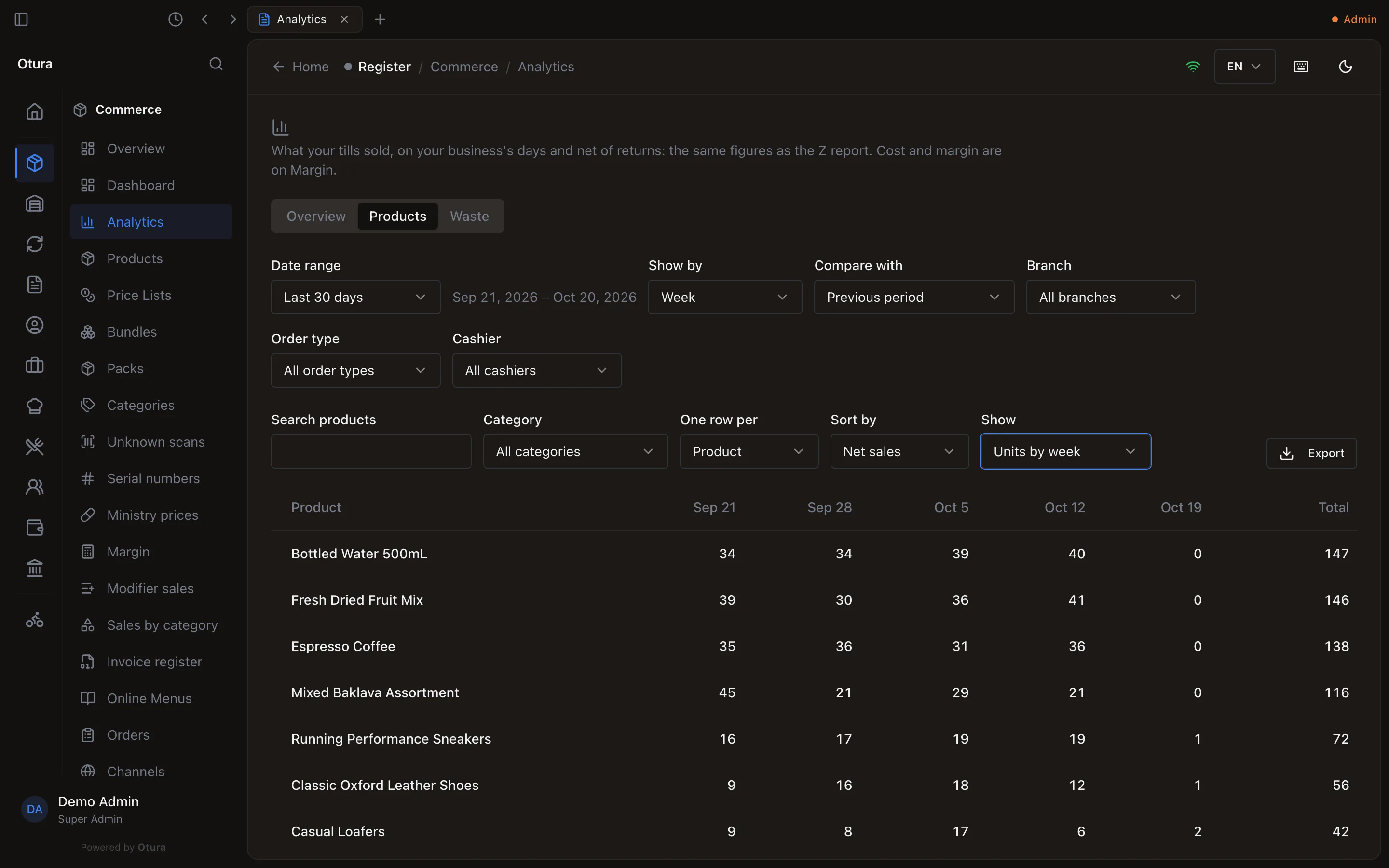
Export saves what the table shows as CSV or Excel. In the desktop app the file goes to your Downloads folder and a message says so; exporting again saves a second copy with (1) added to its name.
Waste
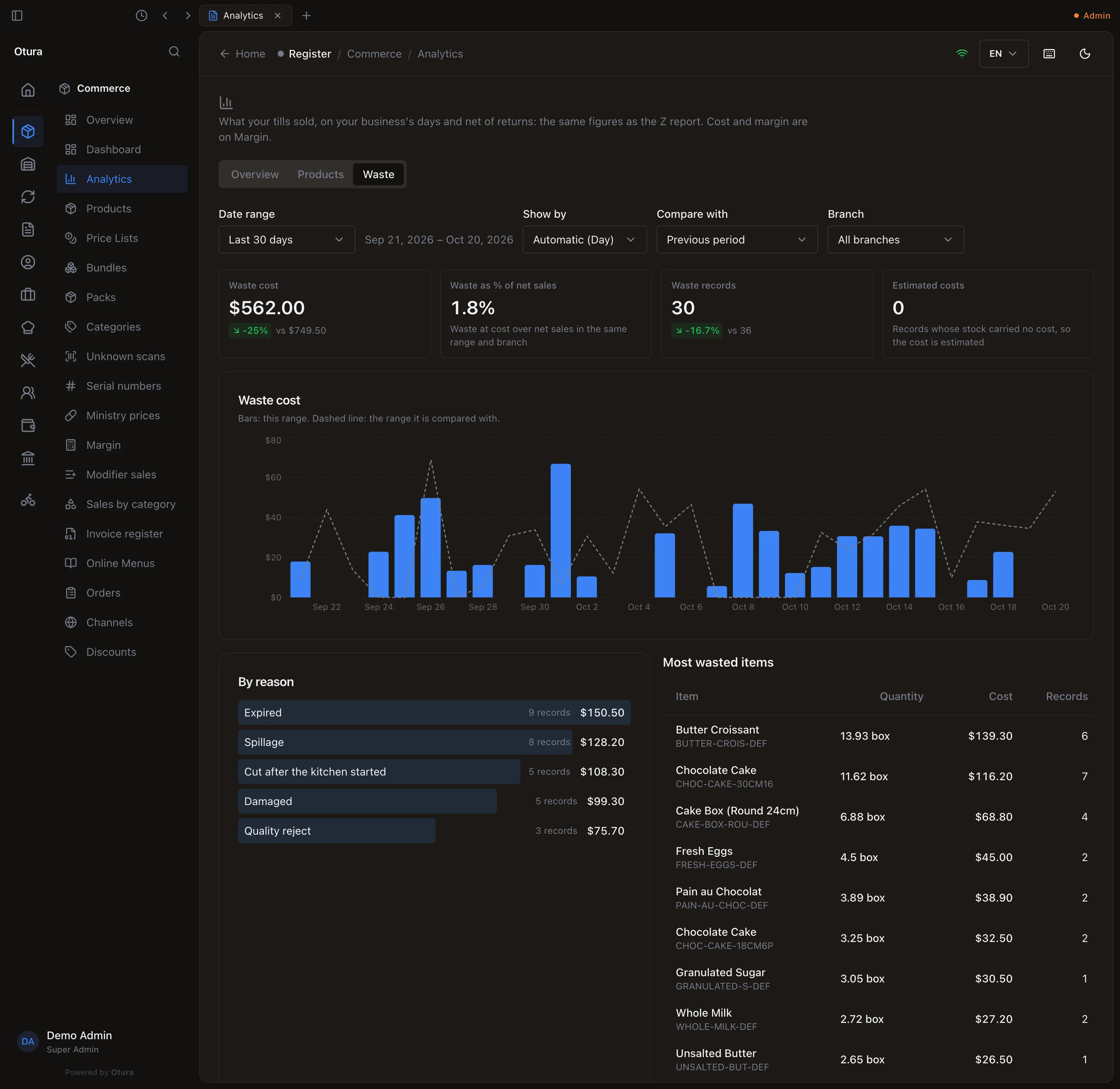
| Figure | What it counts |
|---|---|
| Waste cost | What the waste recorded in the range cost: the cost you typed, else the cost of the stock it used. |
| Waste as % of net sales | Waste cost over net sales, same range and branch. |
| Waste records | How many times waste was recorded. |
| Estimated costs | Records whose stock carried no cost, so the cost was estimated from the item’s stock cost. |
Below: the cost per period, By reason, and the Most wasted items, with each item's SKU under its name and its quantity in the unit it is stocked in.
On the Dashboard
Whoever can open Analytics also sees Net sales today near the top of the Dashboard: what the tills have taken so far today, against the same weekday last week up to the same time of day. At 10:00 on a Wednesday it compares with last Wednesday until 10:00, not with all of last Wednesday, so a morning does not read as a bad day. Under it, a line of net sales over the last 30 days, and Open Analytics.
With the Multi-location module, the same people (the owner and Admin, or anyone given View sales analytics) also see Branch Sales Breakdown and Branch Comparison. A supervisor sees the Dashboard without them: takings by branch over weeks are not the shift in front of them. The two cards show net sales by branch, the same figures as By branch here, over the last 30 days (Branch Sales Breakdown has its own dates); Branch Comparison sets them against the same number of days just before. A till with no branch set, or whose branch was deleted, is counted as Till with no branch, so the branches add up to the Z report. A branch that sold before but nothing now still has its card.
Limits
- A range covers at most five years. The Products tab covers at most one year and shows the top 5,000 products (the totals still cover all of them).
- Units by period shows at most 62 columns and the 100 products that sold the most units; choose a longer period (week, month) for a long range.
- Figures are read from the sales when you open the page. A sale rung a moment ago appears on the next refresh.