Supplier bills, debit notes and payments
When a supplier bill falls due, how a debit note reduces it, how to pay suppliers and reverse a payment, and the payables aging, statement and control reconciliation.
Checked against the product on 25 October 2026
A supplier bill — entered in Rapid Invoice Entry or with Create Invoice (see Getting stock in) — is what you owe that supplier. This page follows it from there: when it falls due, what a debit note takes off it, paying it, and the reports on FinanceAccountingReceivables & PayablesPayables.
Where an unpaid bill sits
Posting a supplier bill that you did not pay on the spot changes no cash. The goods went into stock at their cost when they were received; the bill turns that into what you owe, in 4210 Accounts Payable (a bill that brings no stock books a purchase expense instead), and it opens a bill for that supplier: its number, its due date and its balance. The bill stays on the supplier's What we owe, on the Aging and on the Statement until a payment or a debit note settles it. Paying it later moves the money: debit 4210, credit the cash box or bank account it came from.
| When | Debit | Credit |
|---|---|---|
| The goods are received | Merchandise Inventory (3100), at their cost before VAT | Goods Received Not Invoiced (4215) |
| The bill is posted (stock) | Goods Received Not Invoiced (4215), what the receipt booked; VAT Input (4410) when you recover VAT; Purchase Price Variance (6020) when the bill differs from the receipt | Accounts Payable (4210) |
| The bill is posted (no stock) | Supplier Purchases & Services (6015), and VAT Input (4410) when you recover VAT | Accounts Payable (4210) |
| It is paid | Accounts Payable (4210) | The box or bank account paid from |
When a bill falls due
A bill entered with a due date falls due on that date. A bill entered without one falls due a number of calendar days after the bill's date, taken from the first of these that is set:
- the payment terms entered on the bill itself;
- the supplier's Payment Terms;
- the business's Default term, under SettingsFinancePayment methods → Default payment term.
With none of them, the bill is due on its own date, and is overdue from the next day.
A supplier's Payment Terms (on the supplier's form, under ReplenishmentSuppliers) are picked from your business's list of terms — each shown with its days, such as Net 30 with 30d beside it — or Custom (days), from 0 to 365. Not set leaves the supplier without terms, so their bills fall back to the default.
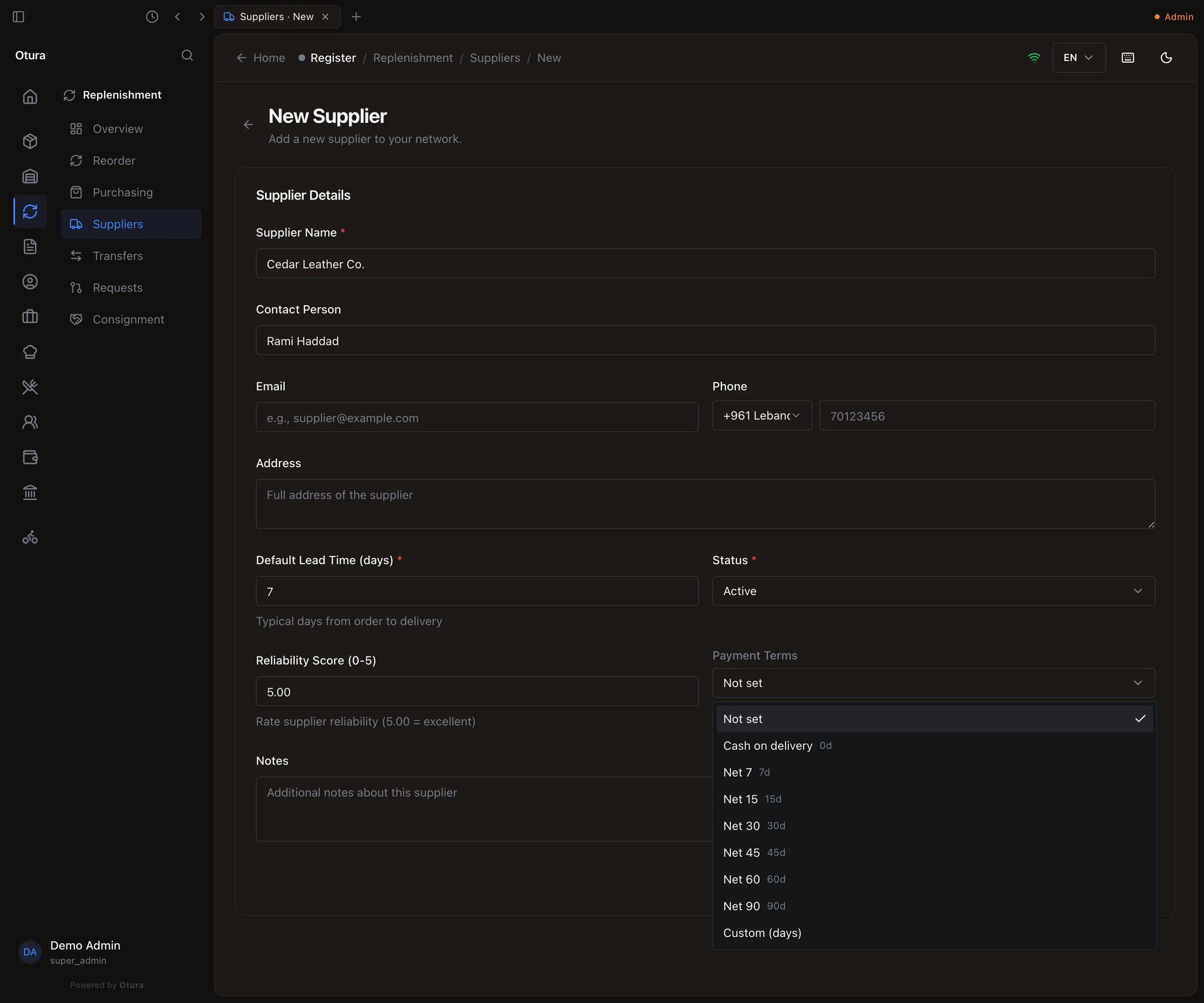
In the example below, Cedar Leather Co. is on Net 30. Its bills of 28 June, 22 August and 26 September, entered without a due date, fall due on 28 July, 21 September and 26 October.
What you owe a supplier
The supplier's page opens on Overview, with What we owe: the Outstanding total, split by age, and every bill not yet settled — its Date, Due date, Original amount, what has been Paid, the Balance and its Status:
| Status | Meaning |
|---|---|
| Open | Nothing has been paid or credited against it. |
| Partly paid | Part of it is settled — by a payment, a debit note, or both. |
| Settled | Nothing is left to pay. A settled bill leaves this list. |
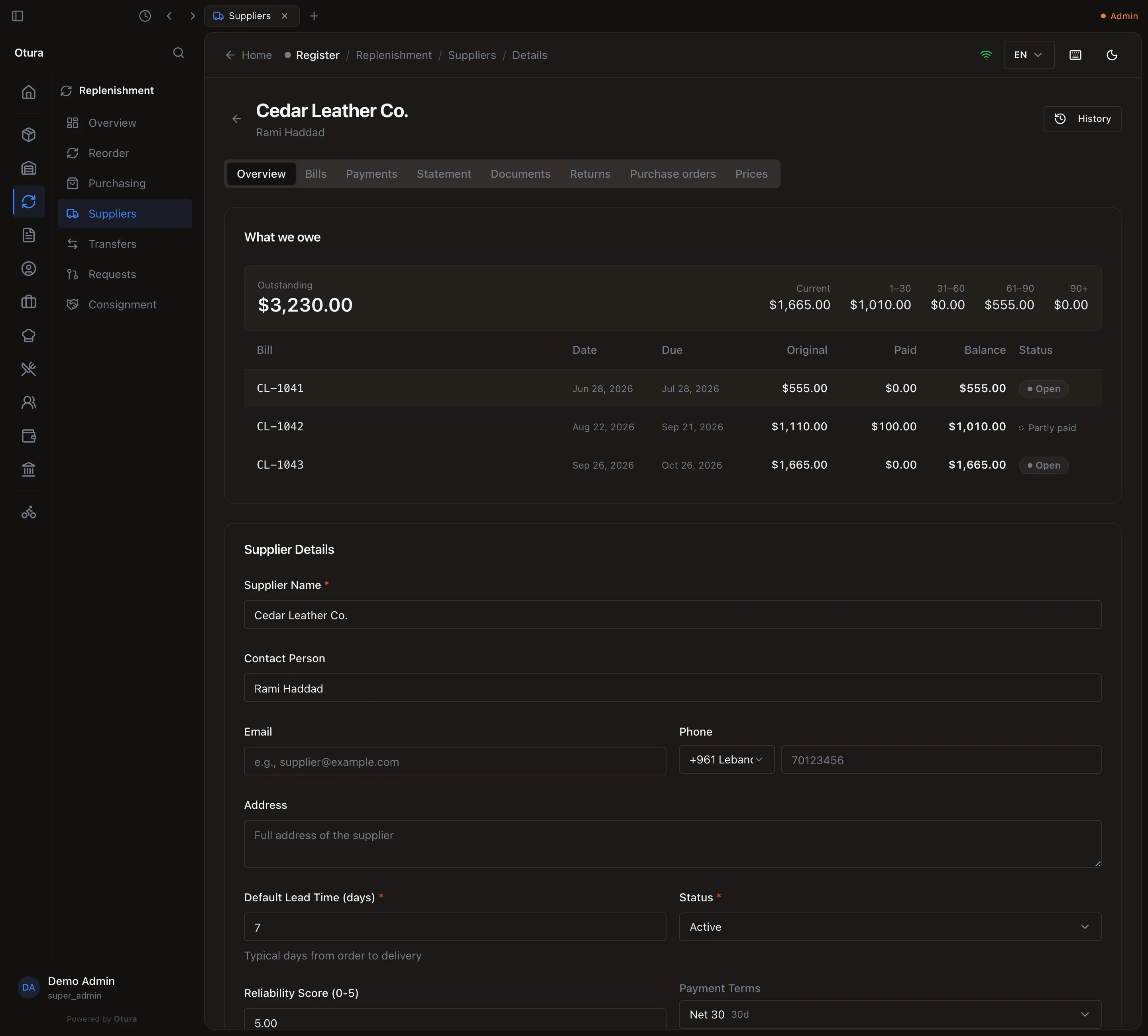
The list holds at most the 500 bills due soonest; past that it says so (see Pay a supplier).
When the supplier owes you instead — a debit note bigger than what was left to pay — the total reads They owe us.
Raise a debit note
A debit note is what you send a supplier when goods go back, or when they owe you money off a bill (a price they agreed to drop). It is raised against one posted bill, on ReplenishmentPurchasingReturns → New Debit Note, or with New Debit Note on the bill's own page.
Pick the bill
Search by invoice number or supplier and choose it. Only bills that are Matched, Disputed or Paid can take a debit note.
Goods going back, or money only
Goods are going back to the supplier is on for a bill that brought stock in: the units leave the lots that bill's receipt brought in, at what they cost. Turn it off for money only. A bill that received no stock can only be debited for money.
The lines
For each line, Lines going back shows what was Invoiced, Already returned, what is Returnable and the Unit cost. Type the Return quantity, or press Return all. A quantity above what is returnable is refused on the line. Add the Reason and, if you like, Notes. The footer shows the total before VAT.
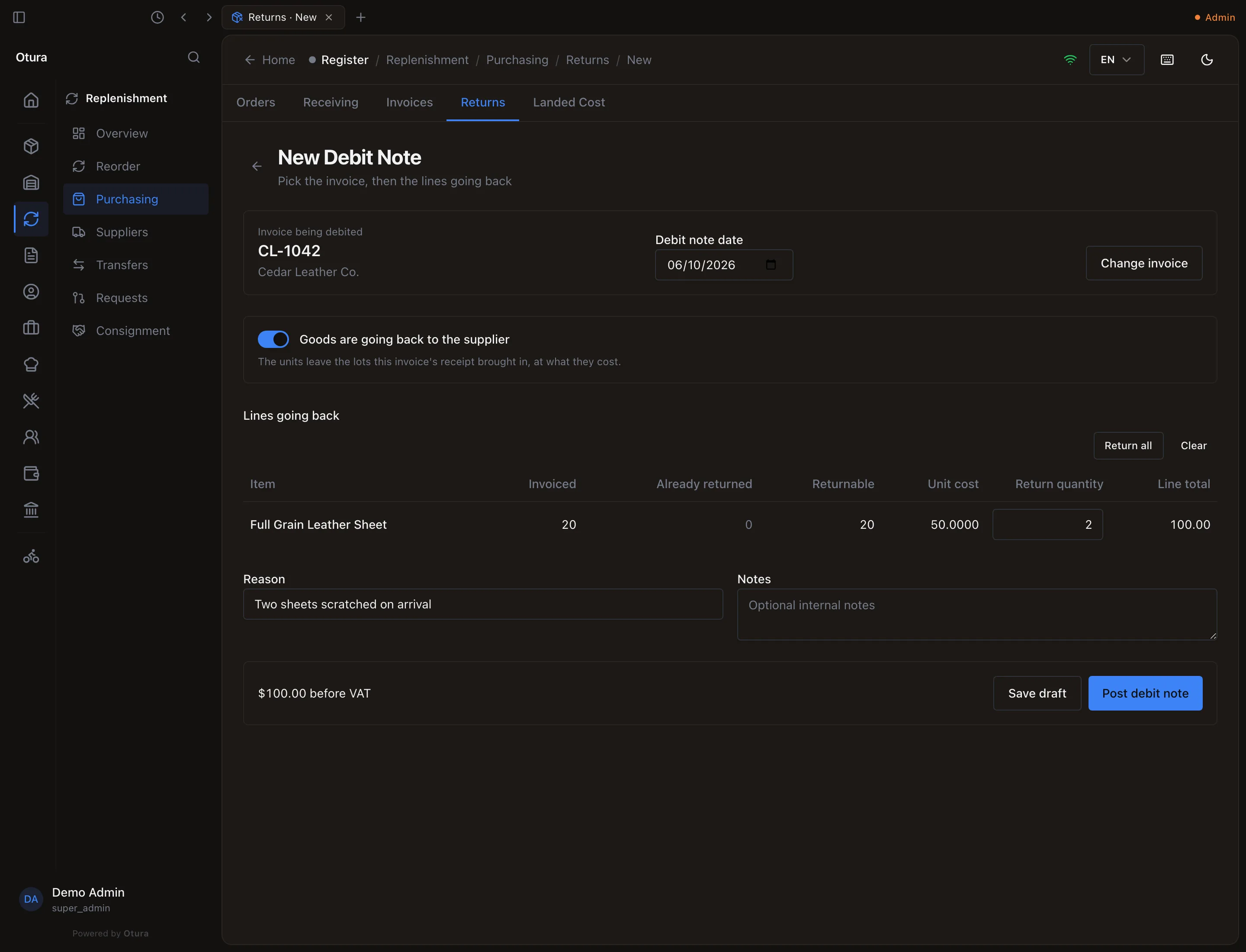
Two scratched sheets going back on CL-1042. Post it
Post debit note asks first (Post this debit note?) and says what it will do. Confirm, and the note is numbered and posted. Save draft keeps it to finish later, from the Returns list.
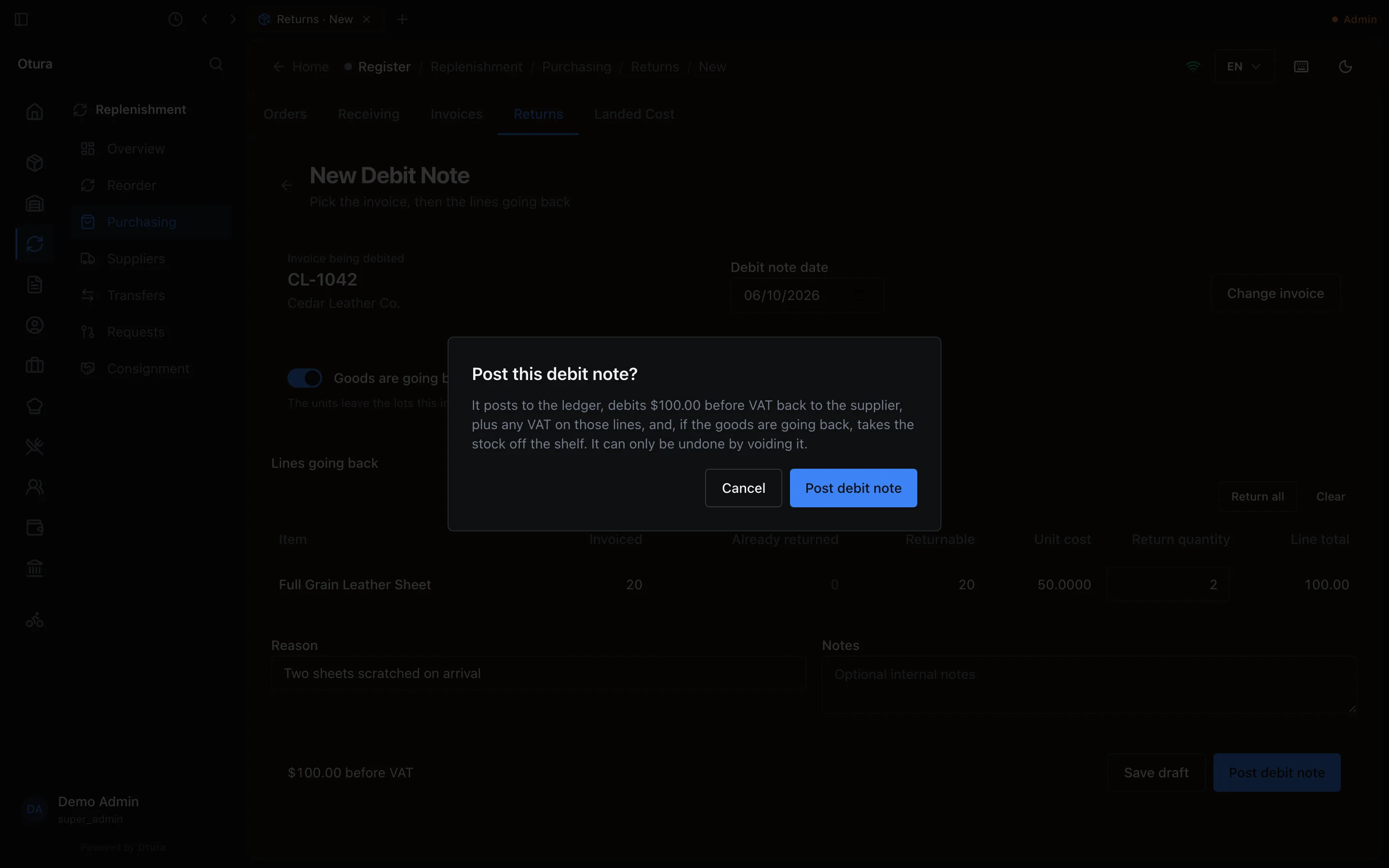
Posting a debit note says what it does first.
What a debit note does
The bill it was raised on is reduced at once. The credit counts as paid on that bill: it reads Partly paid (or Settled), and a payment is offered only what is left. If the bill has less left to pay than the debit note — it was already paid — the rest of the credit stays on the supplier's account. On the supplier's page, Apply credit (Apply the supplier's credit) sets it against other bills you owe them: type what goes to each bill and press Apply. Nothing is posted: the credit was booked when the debit note was.
In the books, the debit note posts:
| Account | Amount | |
|---|---|---|
| Debit | 4210 Accounts Payable | The debit note’s total: the price before VAT, plus the VAT on it, whether or not you recovered that VAT |
| Credit | 3100 Merchandise Inventory | What the goods that went back cost (only when goods go back) |
| Credit | 6015 Supplier Purchases & Services | The share of lines the bill expensed rather than stocked, when it had both |
| Credit | 4410 VAT Input | The VAT given back — only when the bill’s VAT was recovered. When it was not, that VAT was part of the cost, and comes back with the cost |
| Debit or credit | 6020 Purchase Price Variance (6015 Supplier Purchases & Services for a bill with no stock received) | The difference between the two |
A posted debit note has its own page, and is undone with Void debit note and a reason: see Goods sent back to the supplier.
Pay a supplier
On FinanceAccountingReceivables & PayablesPayables, open the Payments tab.
Who, when, how
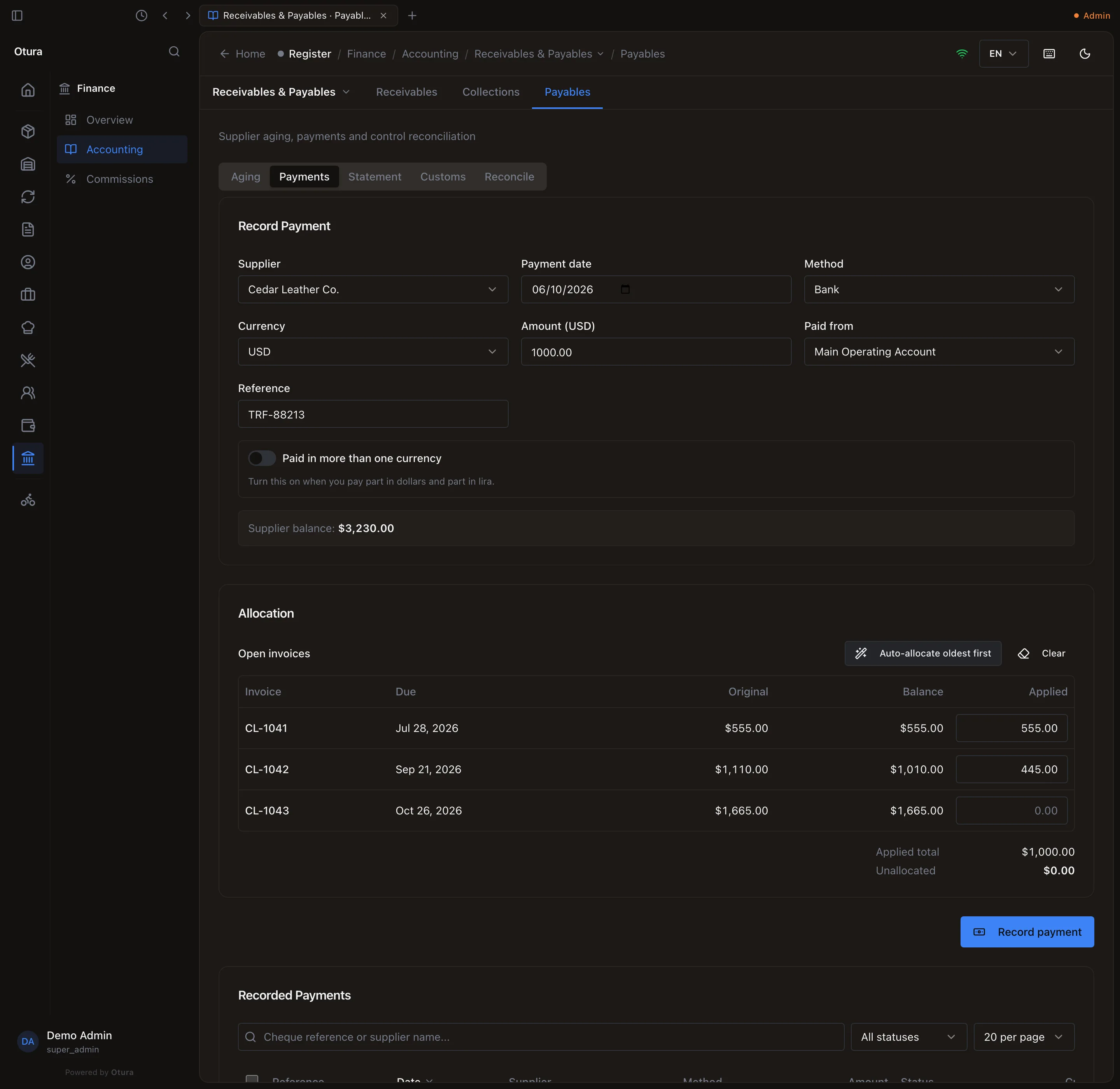
Choose the Supplier (active suppliers only): type part of the name or the contact in Search by name or contact… — every supplier is searched, however many you have — or open this tab from the supplier's page with Pay this supplier, which chooses them for you. Payment date starts at today. Method is Cash, Bank or Transfer, and Currency USD or LBP. The Supplier balance shows what you owe them.
The amount
Type the Amount in the payment's currency. For lira, the Rate (USD to LBP) starts at today's rate; the payment counts in dollars at that rate. Paying part in dollars and part in lira? Turn on Paid in more than one currency and add a row per currency.
Paid from
Paid from lists your boxes that make payments in that currency: cash boxes and vaults for Cash, bank accounts for Bank and Transfer. With only one, it is chosen for you. A Reference (cheque or transfer number, up to 100 characters) is optional.
Allocate it
Allocation lists the supplier's bills with something left to pay, the oldest due first, each with its Original amount and Balance — what is left after payments and debit notes. Type what goes to each bill in Applied, or press Auto-allocate oldest first. A supplier payment must be fully allocated: Unallocated must be $0.00, and nothing can be paid on account.
The list holds at most 500 bills, the soonest due. A supplier with more open bills than that shows This account has more than 500 open items. Only the 500 due soonest are listed; settle them to bring the rest into view.
Record it
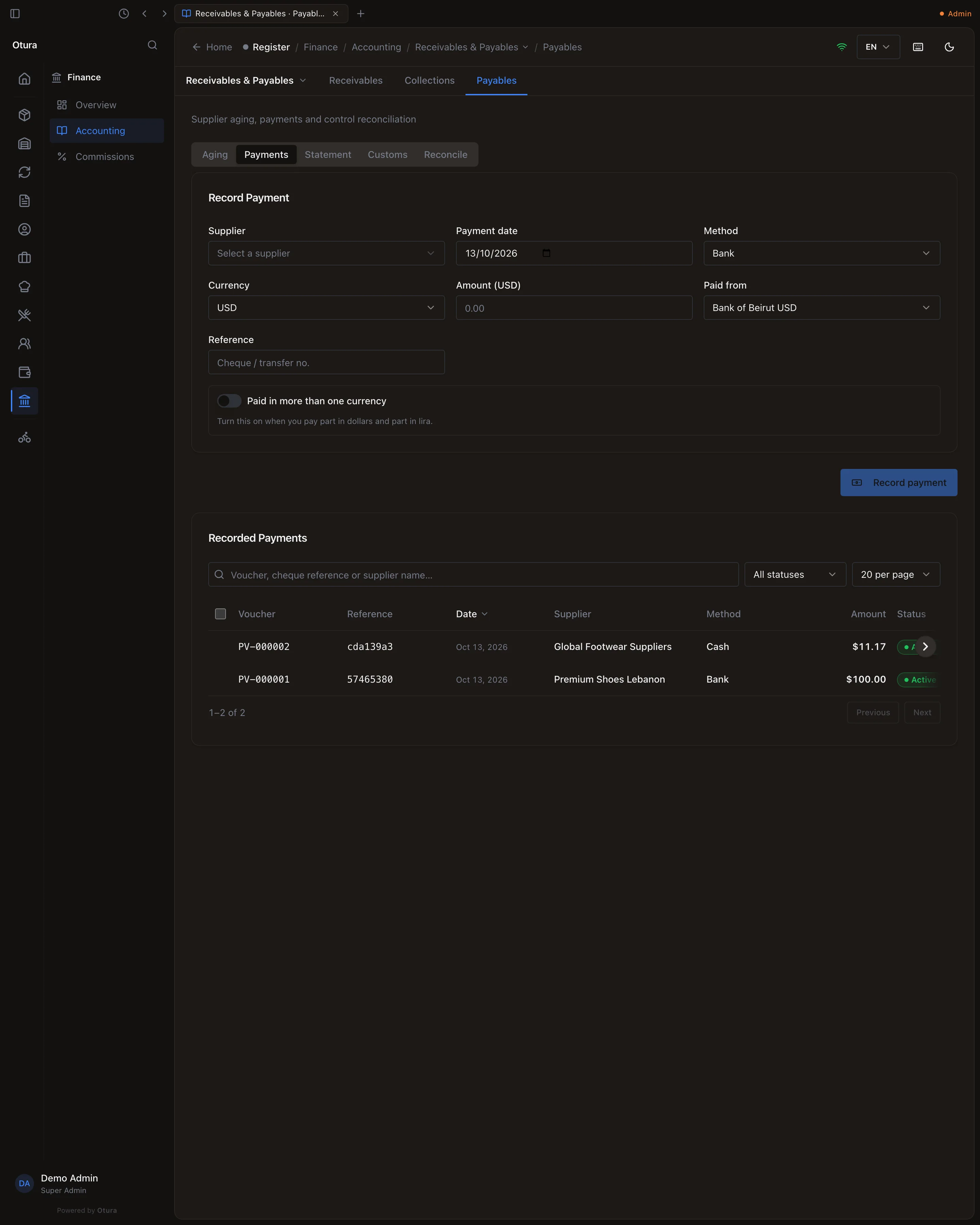
Press Record payment. It appears under Recorded Payments with its Voucher number: PV-000001, PV-000002 …, one series with no gaps. The search finds a payment by its voucher number, its cheque or transfer Reference, or the supplier.
The payment is refused when:
- it is dated in a month that is not open;
- its day's cash has already been counted at End of Day — the message says so, and Record anyway records it regardless;
- it would take a cash box or vault below what the books say it holds (see Paying a supplier from a cash box). The message says what the box holds, and Record anyway records it regardless, for the day the books are behind the cash.
Paying a bill in lira
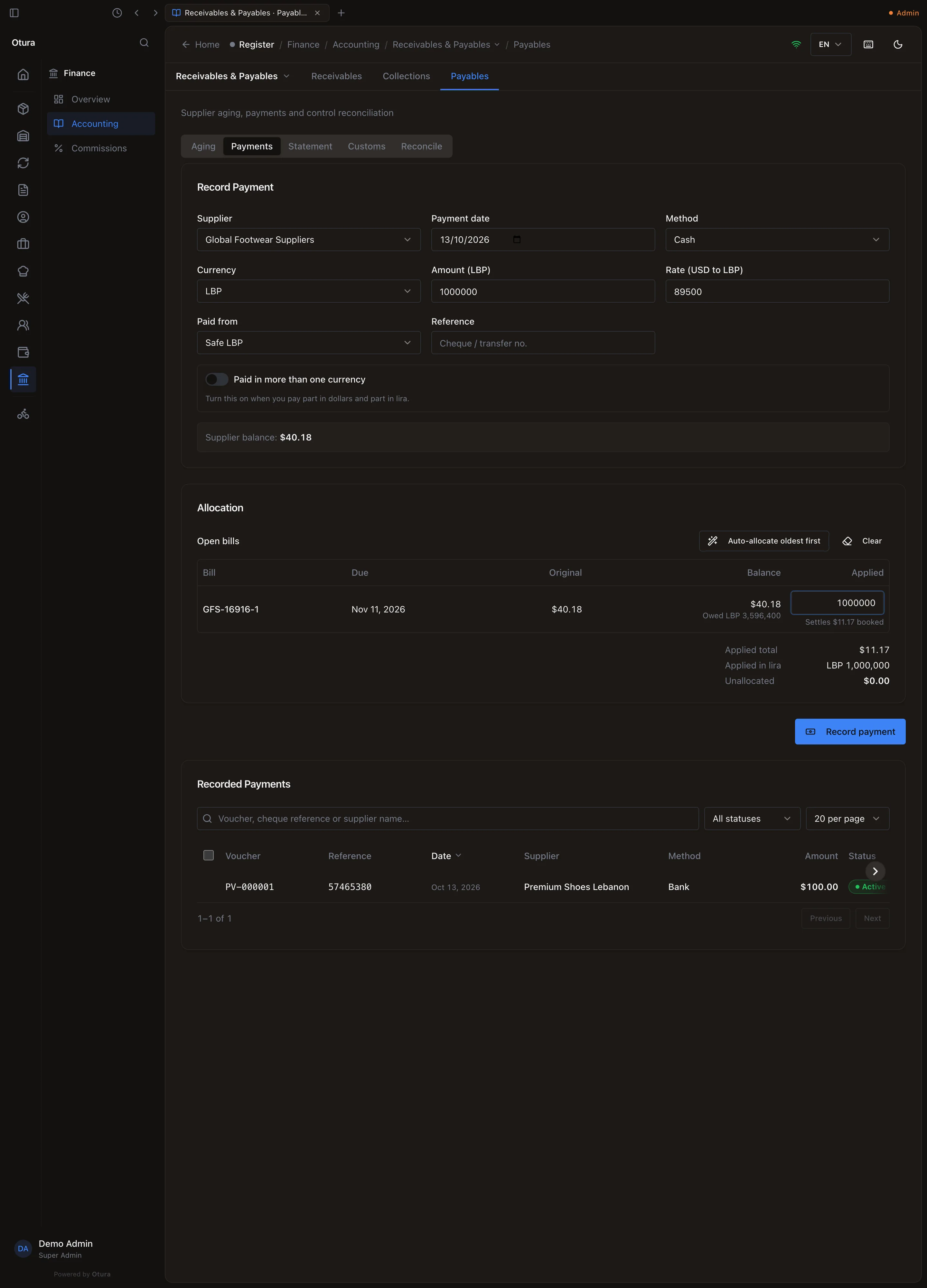
A bill entered in lira is owed in lira: its row in Allocation shows what it owes in lira. Pay it in LBP (or with a lira row of a payment in more than one currency) and the lira you type comes off its lira exactly: 1,000,000 LBP paid on a bill of 3,596,400 LBP leaves 2,596,400 LBP owed. What that lira is worth at the payment's rate can differ from the dollars the bill was booked at; the difference is posted to Exchange Gain or Exchange Loss.
What a payment does
Each bill's balance drops by what was applied to it, and the payment posts:
| Account | Amount | |
|---|---|---|
| Debit | 4210 Accounts Payable | The payment, in dollars |
| Credit | The box’s account (5120 Bank Account - USD for the box above) | The same dollars; for a lira payment, with the lira actually paid on the line |
With no box in that currency, a payment posts to the standard account for its method: cash to 5100 Cash Register (5105 Cash Register - LBP in lira), bank and transfer to 5120 Bank Account - USD or 5130 Bank Account - LBP. If one of your boxes is kept on that account, choose it.
Reverse a payment
Under Recorded Payments, tick the payment and press Reverse (or R). It asks Reverse payment TRF-88213 to Cedar Leather Co.? and needs a Reason for reversal before Reverse payment will work.
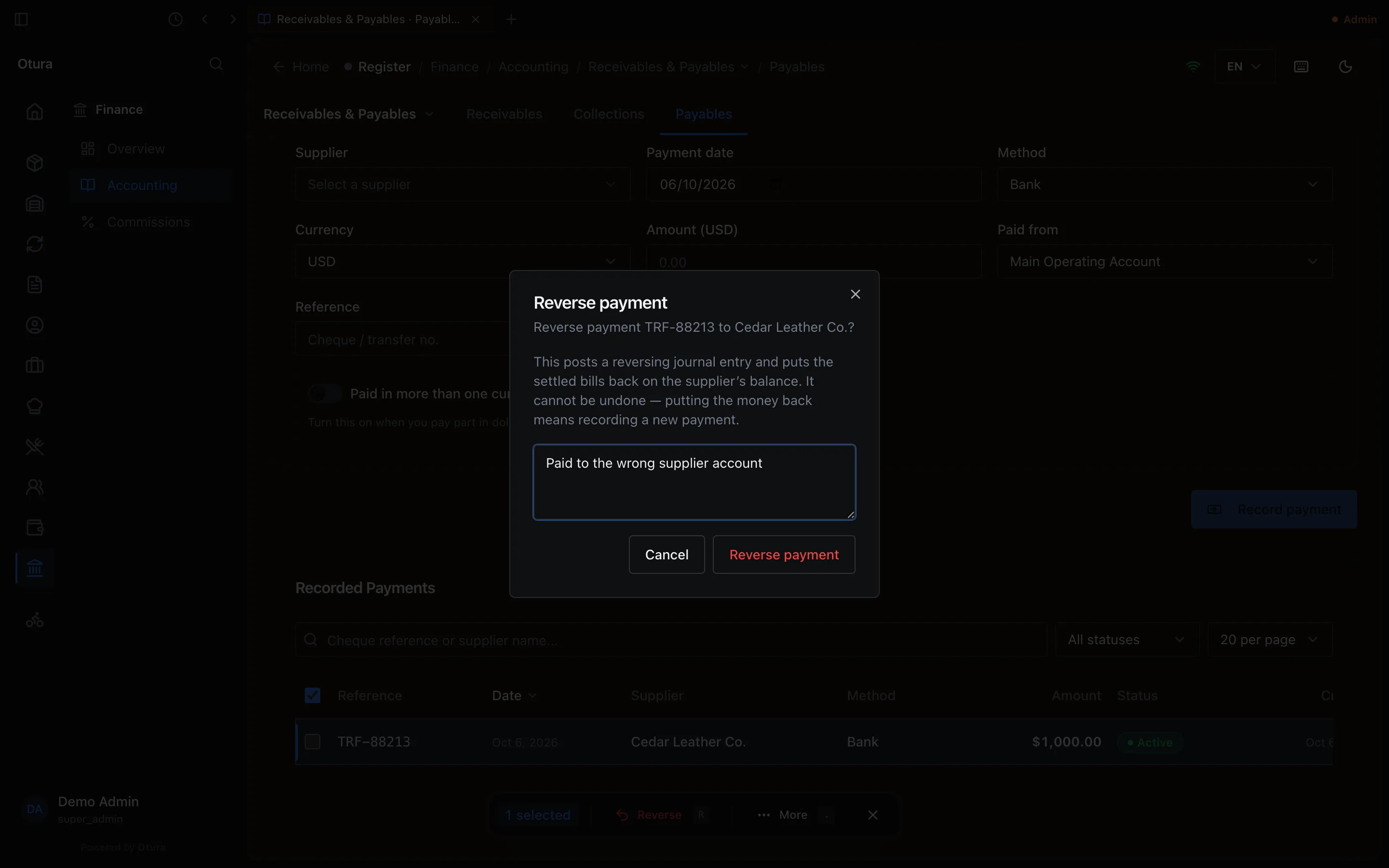
It posts the mirror of the payment — debit the box's account, credit 4210 — dated today, puts each bill back as it was, and marks the payment Reversed. It cannot be undone: to pay again, record a new payment.
Paid when the bill is entered
A bill paid the moment it is entered is paid in the post confirmation of Rapid Invoice Entry: Did you pay this invoice? → Pay in full (see Entering supplier invoices). It records the same payment, with its voucher number, and the bill is settled at once. A bill paid in full, there or on the Payments tab, reads Paid on ReplenishmentPurchasingInvoices.
Payables aging
The Aging tab: choose the As of date and press Generate. Each supplier's unpaid bills are spread by how far past their due date they are on that day, in dollars, largest supplier first. A past date shows the payables as they stood at the end of that day: a bill paid since still counts, at what was left to pay then, and a payment or debit note made after the date does not count, with an All Suppliers total. Print / Save PDF prints it.
| Column | Days past the due date |
|---|---|
| Current | Not yet due (or no due date) |
| 1–30 | 1 to 30 |
| 31–60 | 31 to 60 |
| 61–90 | 61 to 90 |
| 90+ | More than 90 |
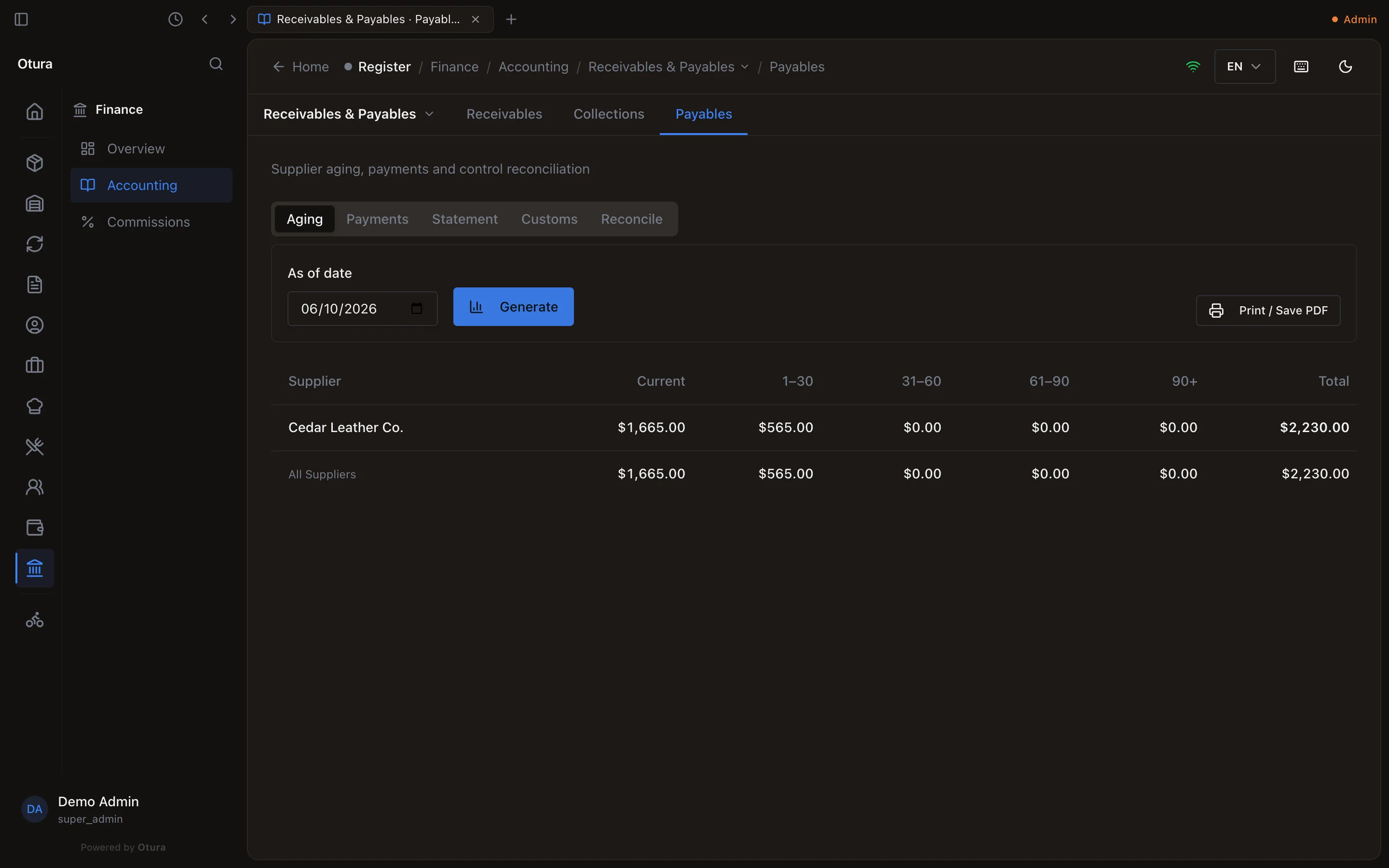
A credit left on a supplier's account by a debit note counts as a negative amount under Current.
Supplier statement
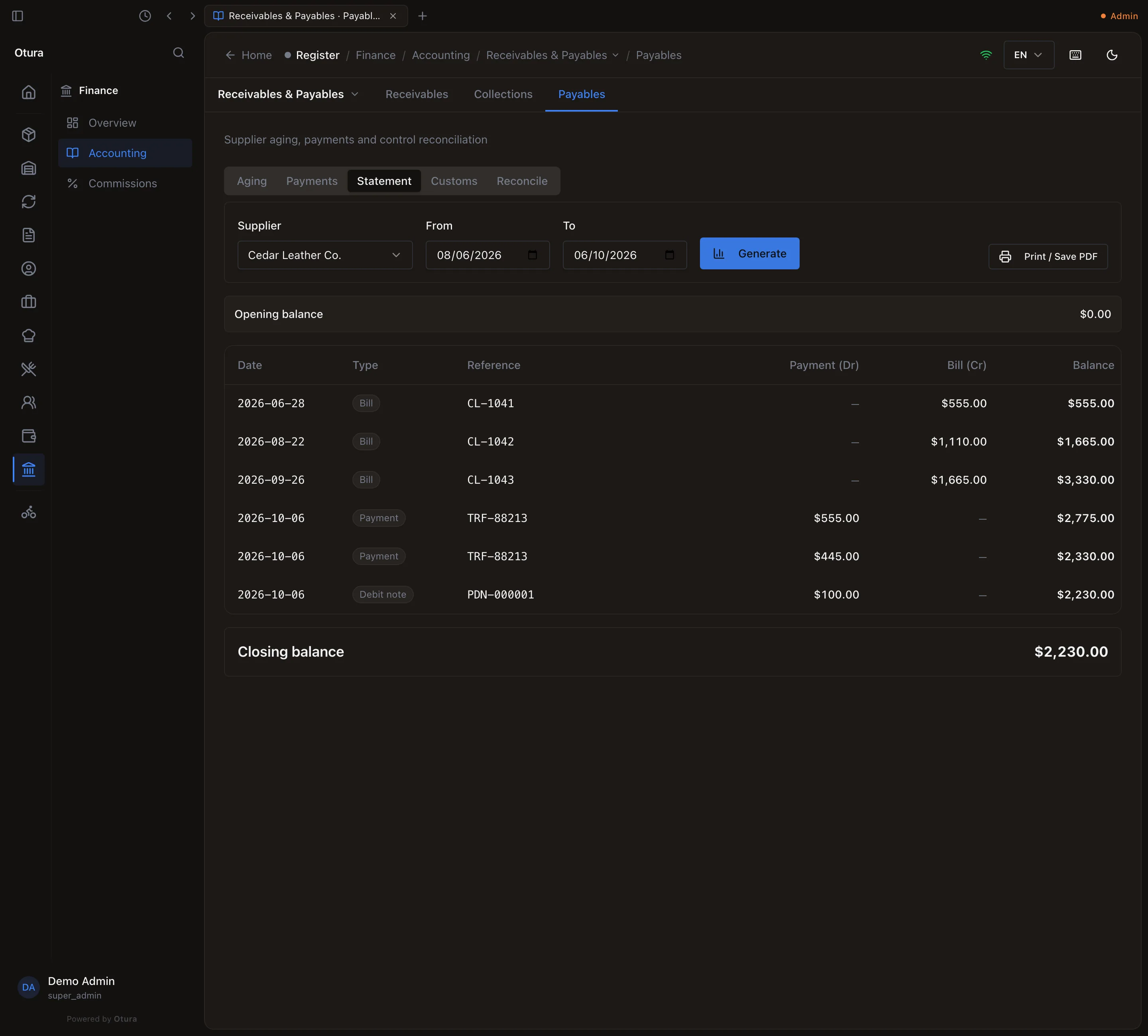
The Statement tab: choose the Supplier (searched by name or contact; suppliers you no longer trade with are included), From and To, and press Generate. It shows the Opening balance, every Bill, Payment and Debit note in between with the running Balance, and the Closing balance. Print / Save PDF prints it to send to the supplier.
Check the payables against the books
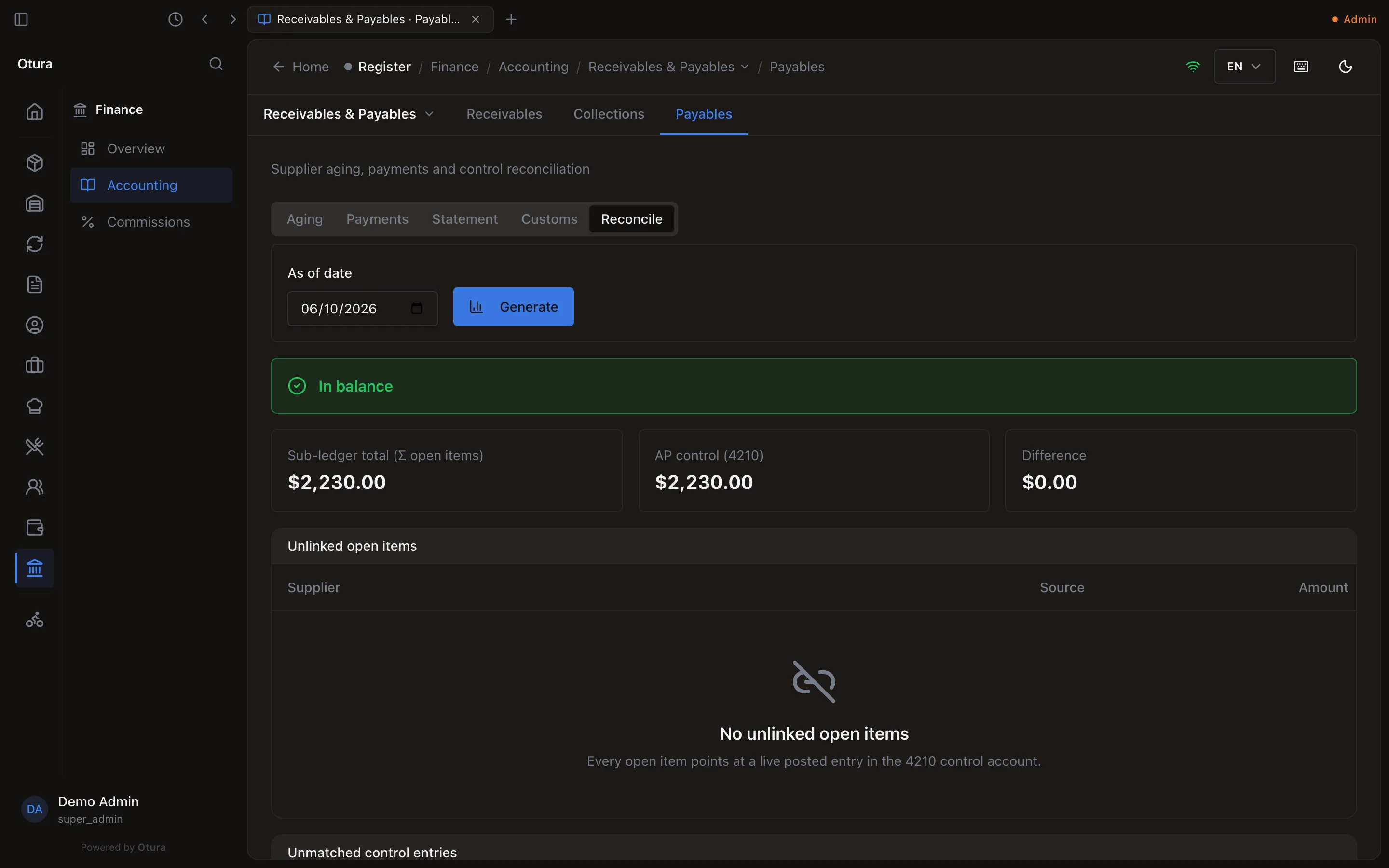
The Reconcile tab compares the bills you owe, added up (Sub-ledger total), with the balance of 4210 Accounts Payable (AP control (4210)) on the As of date, and reads In balance or Out of balance. When it is out, it lists what explains the difference: Unlinked open items (a bill whose journal entry is missing) and Unmatched control entries (an entry on 4210 that is not a bill — a journal entry typed straight onto the account, for example).
Where supplier payments sit among the rest of your money is in How money moves.