Taking payment, receipts and the bill
Checkout with or without a receipt, quick cash in one key, printing the last receipt again, the unpaid bill, and why the lira total is a round figure.
Checked against the product on 13 October 2026
Four ways to pay
| How | Payment screen | Receipt |
|---|---|---|
| Checkout (Ctrl+P) | Yes: cash, card or on account, with change | Shown on screen, ready to print |
| Ctrl+Shift+P | Yes | None |
| Quick cash (F10) | No: the exact total, in dollars cash | Printed straight away, not shown on screen |
| Shift+F10 | No: the exact total, in dollars cash | None |
Checkout is the one to use when you are not sure: it asks what was handed over and shows the change. The others are quicker when you already know the answer. On a Mac, use ⌘ where this page says Ctrl.
The payment screen
Checkout (Ctrl+P) opens Payment, with the total in dollars and in lira. Choose how the customer pays, then finish with one of the two buttons at the bottom:
- Complete Payment, the button with the printer icon, takes the payment and shows the receipt.
- Without receipt takes the payment and prints nothing. The till goes straight to a new order.
Enter pays the way the screen was opened. Checkout and Ctrl+P open it on Complete Payment, and Ctrl+Shift+P opens it on Without receipt. The filled-in button is the one Enter presses.
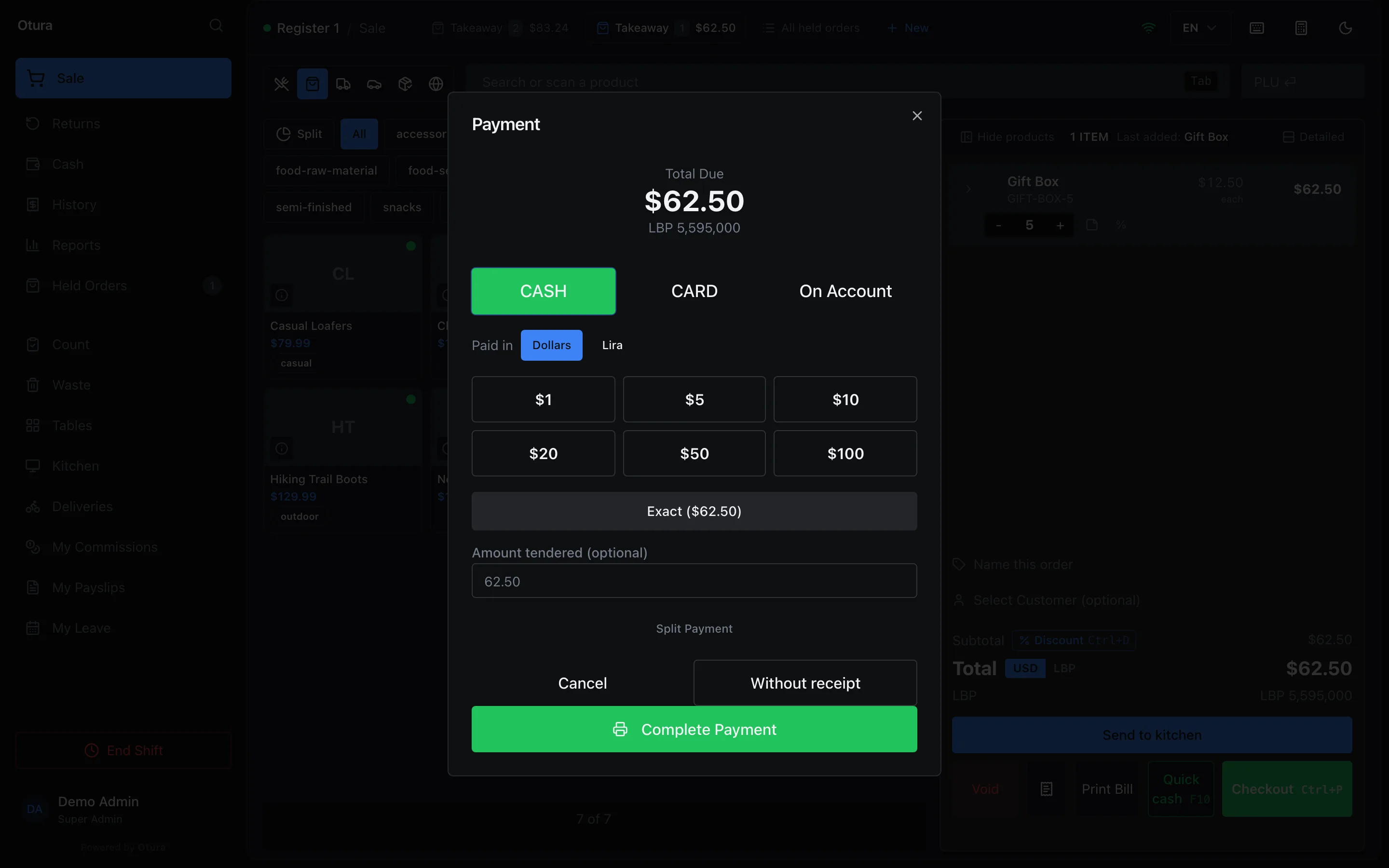
After Complete Payment, the Receipt appears. Press Print (or P) to print it, or New Sale (or Enter) to go on. If Auto-Print After Sale is turned on, the receipt prints as soon as the sale is complete (see Printers).
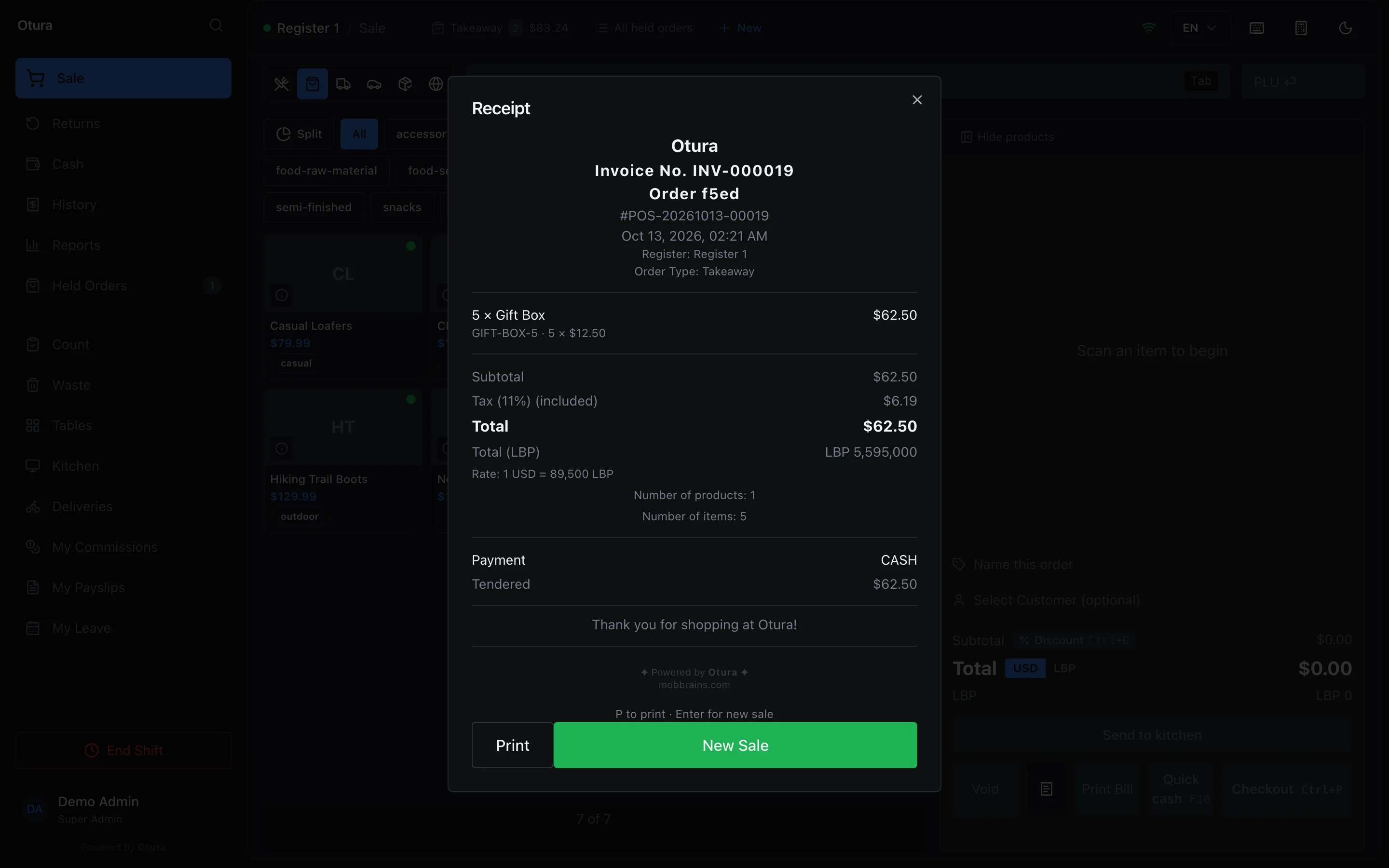
Every sale's receipt carries its invoice number under the business name, for example Invoice No. INV-000019. It cannot be switched off in the receipt settings (see Receipt settings). A customer who comes back with the receipt can be found by that number in the till's History and on the Returns screen. The paper of a return or a void carries a credit note number instead, for example Credit note No. CN-000045.
A cash sale paid without a receipt still opens the cash drawer, if the drawer is set to open on receipts.
When the order has a product sold by serial number, the payment screen also asks for each unit's serial before it takes the payment. See Serial numbers.
The order must not change while you take the payment
The payment is taken at the total the payment screen shows. So the till holds the payment while the order is still changing:
- While a line just added is still on its way, or any other change to the order (a quantity, options, a delivery fee) has not reached the server yet, Complete Payment and Without receipt wait until the change has landed, with Still updating the order. Pay in a moment, once it is up to date. above them. Checkout pressed at that moment says the same and does not open the payment screen.
- An item scanned while the payment screen is open is not added. The till says Scan not added: the payment is open. Close it to add the item, so the total is the one you charge.
- If the order changed anyway, for example from another window on the same register, the payment is refused and the message names both totals: The order changed while this payment was open: its total is now $27.00, not $20.00. Check the order and take the payment again. The sale is not recorded, and the payment screen shows the new total for the next try.
If the server does not answer a change to the order or the payment within 20 seconds, the till stops waiting and says The server did not answer in time. Check the cart before trying again — it may already have gone through. Look at the cart and at the shift's transactions before taking the money again: if the first payment went through, the sale is already there.
Paid in lira, change in lira
With CASH chosen, Paid in offers Dollars and Lira. Choose Lira for a customer paying in lira notes. The screen shows Due in lira, rounded to the shop's cash step (see Cash rounding), with quick amounts under it: Exact and the next round sums of notes. Type what was handed over in Lira handed over (optional), or press a quick amount.
Change Due then shows the change, and Give change in chooses its currency: Lira or Dollars. For example, a $10.00 order at 89,500 is due as LBP 895,000. The customer hands over LBP 1,000,000, and the change is LBP 105,000 in lira. Change given in the other currency is worked out at the order's rate and rounded to what can be handed back in that currency.
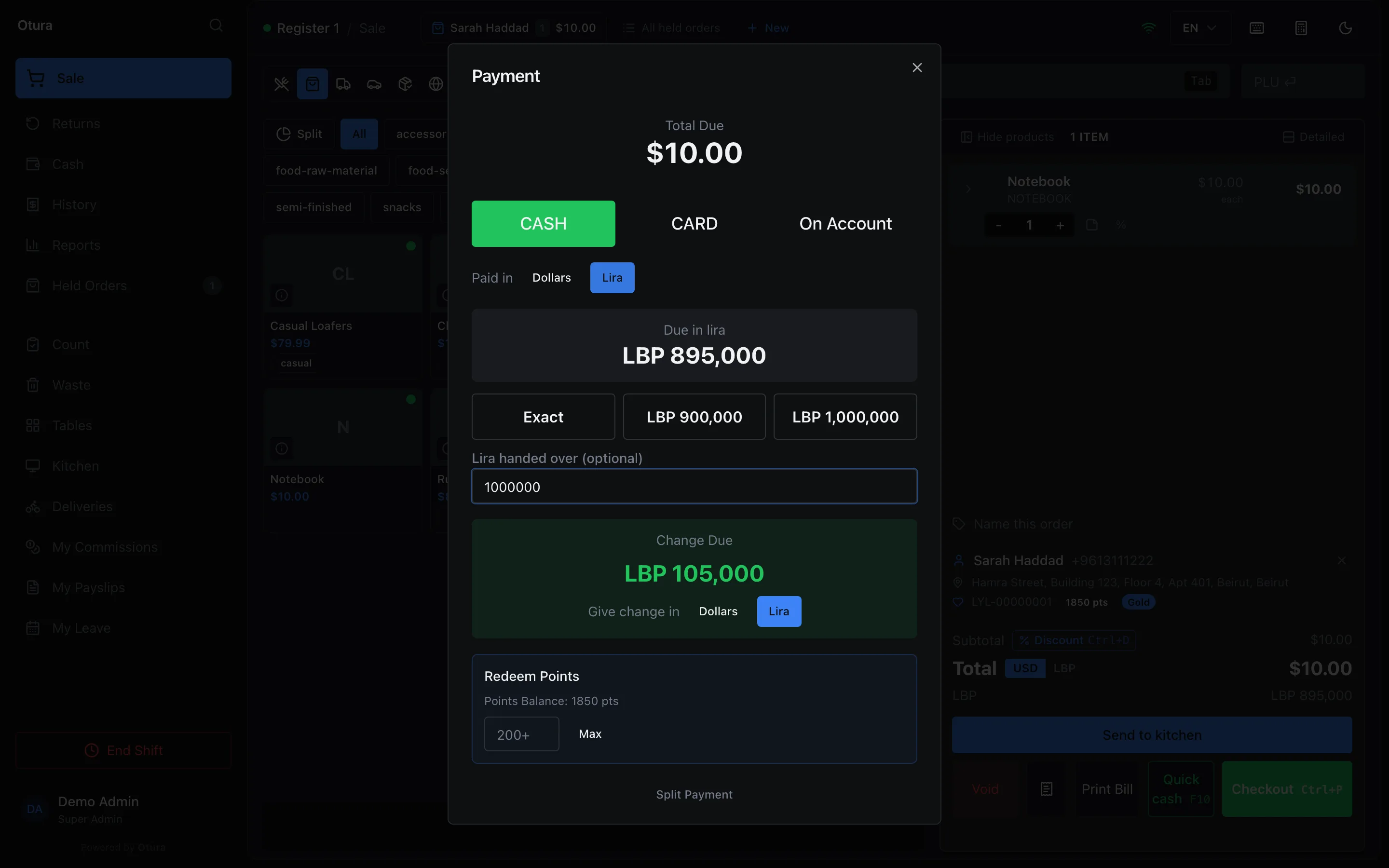
The receipt prints what changed hands in the currency it changed hands in: here, LBP 1,000,000 tendered and LBP 105,000 change, not their value in dollars. A receipt printed while the till is offline quotes the lira total rounded to the cash step, the figure the customer was asked for.
Split payment
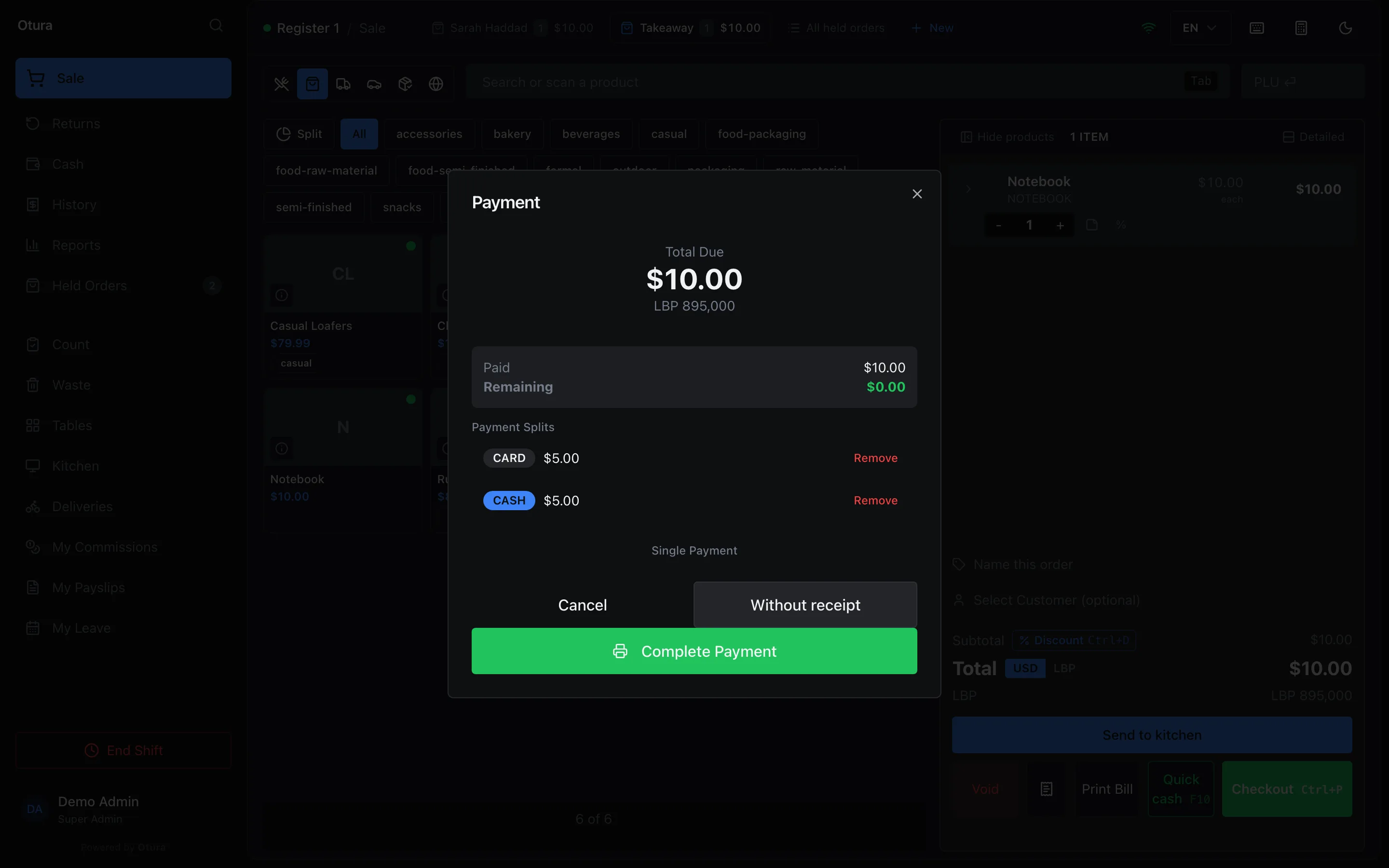
Split Payment, at the bottom of the payment screen, takes the total in parts, for example half on a card and half in cash. For each part, choose CASH, CARD or On Account, type its Amount (USD) (or press Fill Remaining), and press Add Split. A cash or card part can be paid in lira too. The parts are listed under Payment Splits, each with Remove, and Paid and Remaining show how far the payment has got. Single Payment goes back to one way of paying.
- The parts must cover the total to the cent. On a $10.00 order, $5.00 on a card and $4.99 in cash leave $0.01 Remaining, and Complete Payment stays greyed out until the last cent is paid. They cannot come to more than the total either: money handed over beyond a part is change, typed as that cash part's Amount Tendered.
- For a cash part in dollars, Amount Tendered is what the customer handed over for it. Less than the part's amount is refused at Add Split: Tendered is less than this cash payment. For example, a $5.00 cash part with $2.00 tendered cannot be added. With $10.00 tendered it can.
On account
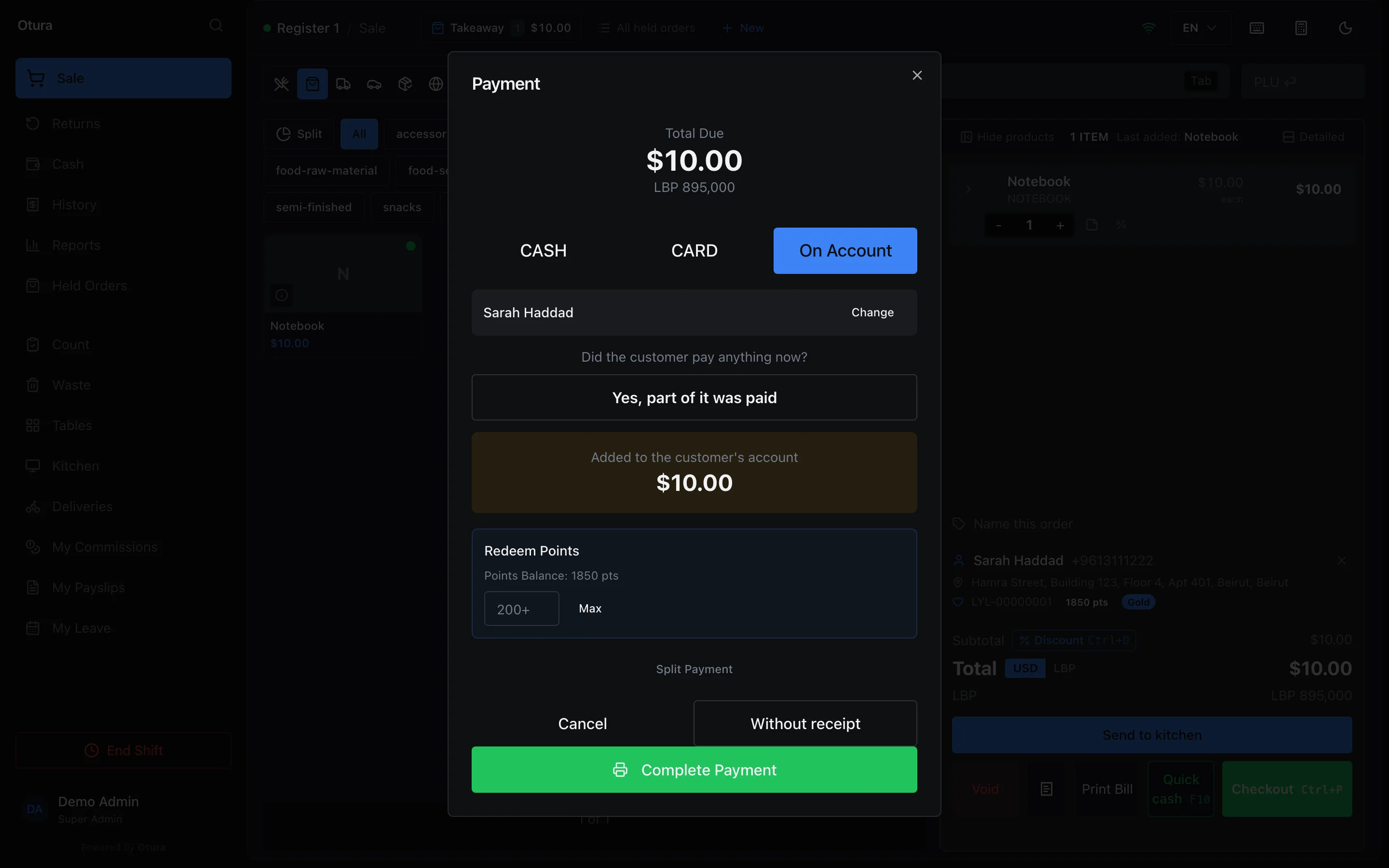
On Account puts the sale on the customer's account, to be paid later. It needs a customer: on an order with none, the screen asks Who is this going on account for?, and Choose customer opens the customer search. The customer chosen is named on the screen, with Change to pick someone else. A sale on account cannot be completed without a customer, in a split payment too.
The screen then asks Did the customer pay anything now? If not, press Complete Payment: the whole total is shown under Added to the customer's account. If the customer paid part of it, press Yes, part of it was paid and type the amount in Paid now (or press one of the note buttons). That part is taken as cash, and the rest goes on the account: Added to the customer's account shows what is left. Put all of it on account clears the amount.
A sale that would take the customer past their credit limit asks for a supervisor: someone other than the person selling enters their PIN and approves it. Your own PIN is not accepted unless your role has Approve own over-limit sales (off for every role until the owner ticks it, for a shop with one person at the till); discounts and voids always need someone else. The customer's statement and aging name the debt by the invoice number on their receipt (INV-…), and a return against it by its credit-note number (CN-…).
Account sales need the connection: on a till that is offline, the payment screen says so, and the sale is taken in cash or by card instead. Redeeming loyalty points and spending an exchange credit need it too; offline the points box is greyed out and says so. On a delivery order the same button is COD. See Selling when the connection drops.
Switching a payment method off
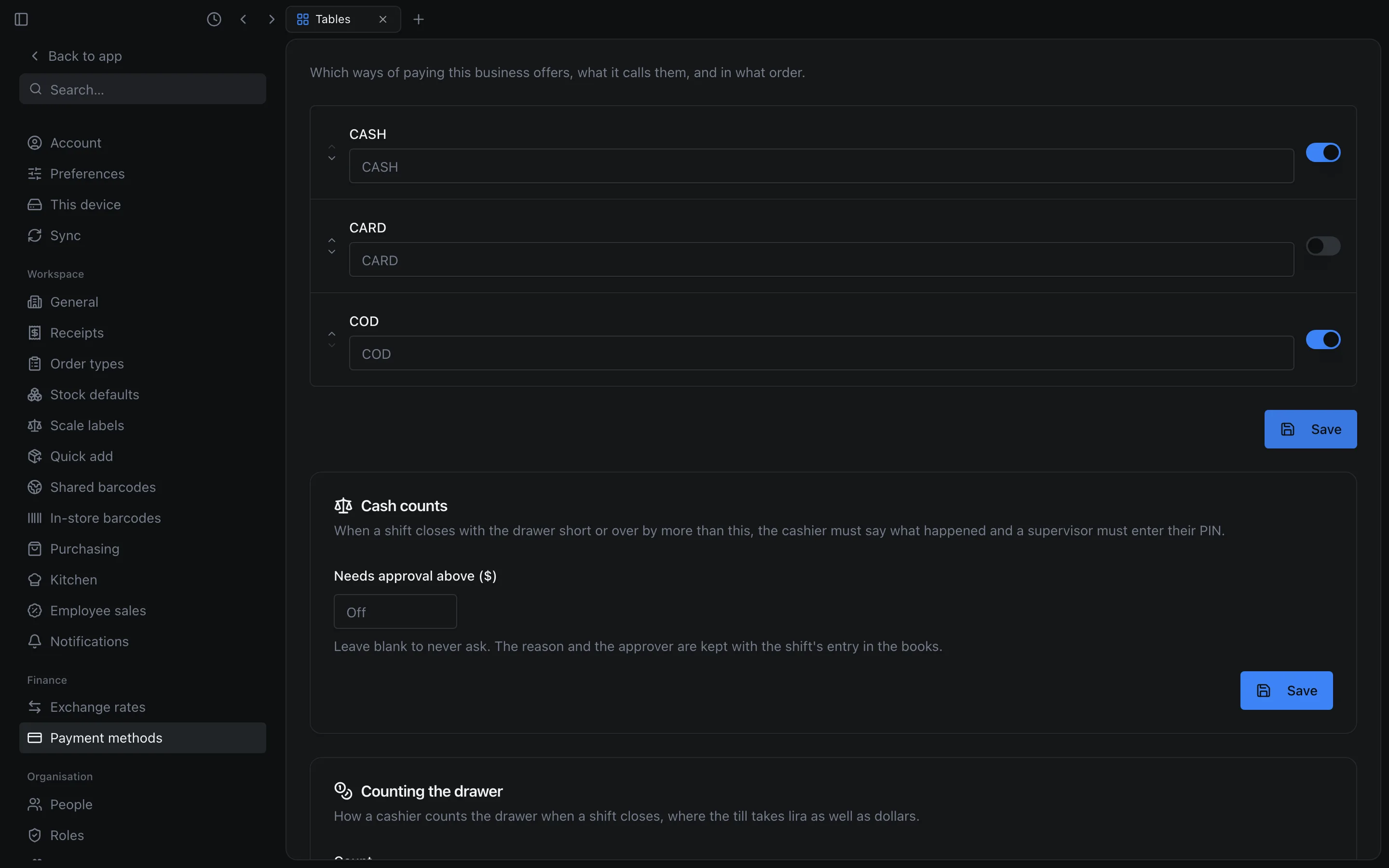
Which ways of paying the till offers is set in SettingsFinancePayment methods. Each method has a switch (for a card, Offer CARD) and a name box for the name the till shows. Switch a method off and press Save: the payment screen no longer offers it. With CARD off, the payment screen has no CARD button, its key (2) does nothing, and Split Payment does not offer it as a part either. In Settings, the method the till calls On Account is listed as COD.
Quick cash
Quick cash (F10) is for a customer who hands over the exact amount in dollars. The till records the whole total as cash, with no payment screen. It shows Paid $12.50 in cash, prints the receipt straight away without showing it, and starts the next order. Shift+F10 does the same without printing a receipt.
A delivery, an exchange or an order with a product sold by serial number always shows the payment screen, because each has something to ask about there. The Quick cash button is not shown on a delivery order. If the payment is refused, the payment screen opens with the reason.
Printing the last receipt again
F6, or the receipt button between Void and Print Bill, prints this shift's last completed sale again. It works with an empty cart too, for a customer who comes back for their receipt. It uses the same receipt layout as the original sale, and does not open the cash drawer. If this shift has no sale yet, the till says No sale on this shift yet.
The unpaid bill
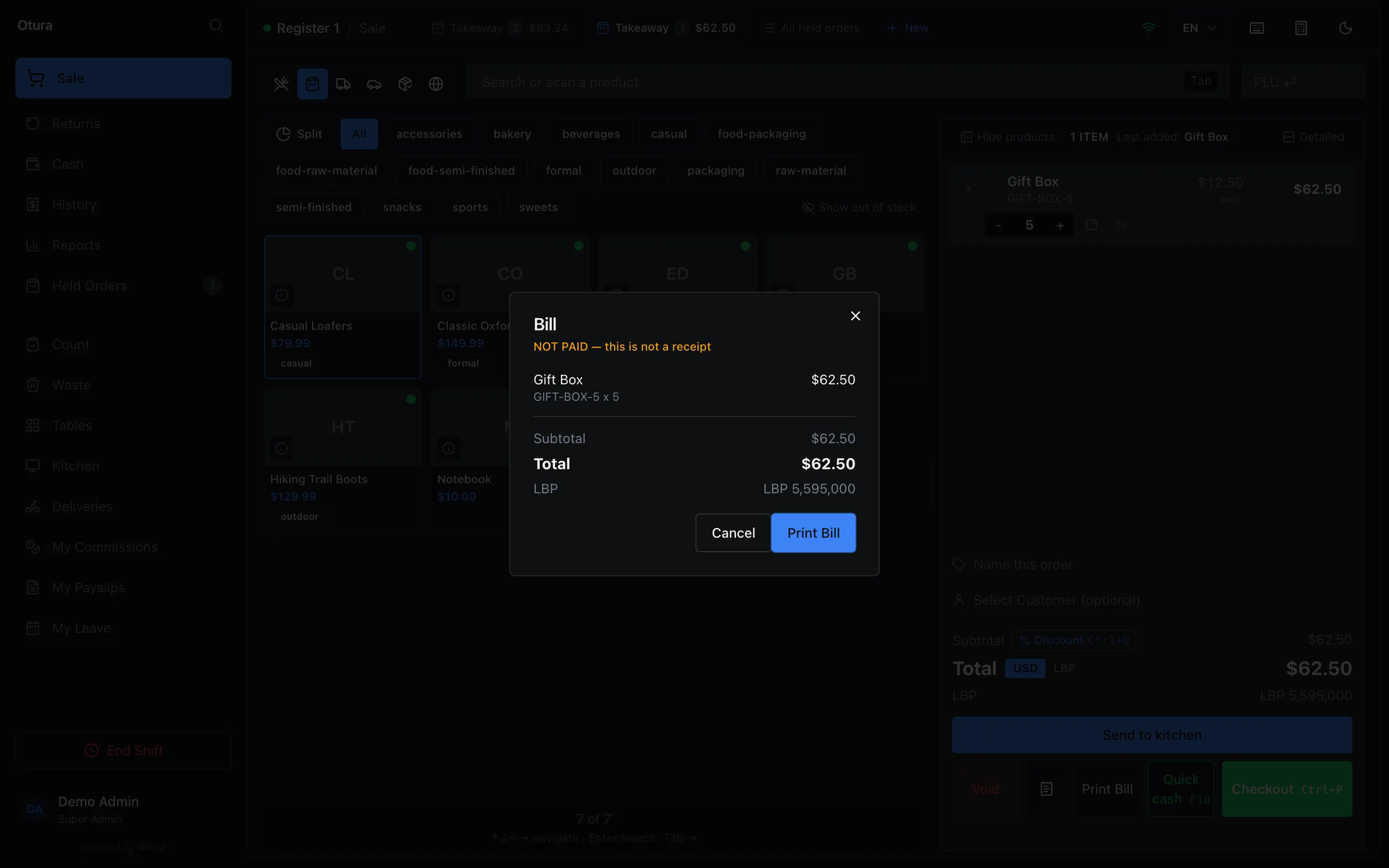
Print Bill (F7) shows the order's total before payment, for any kind of order. The window is headed Bill (or the table's name, for example Table T1) and marked NOT PAID — this is not a receipt. It lists the lines, the Subtotal, any discount, any delivery fee, the Total and the lira total. Its Print Bill button prints it with NOT PAID — this is not a receipt at the top. The lines are in the till's currency (see the USD | LBP switch), and the totals are in both. Otura records each bill printed, with who printed it, on which till, and the total.
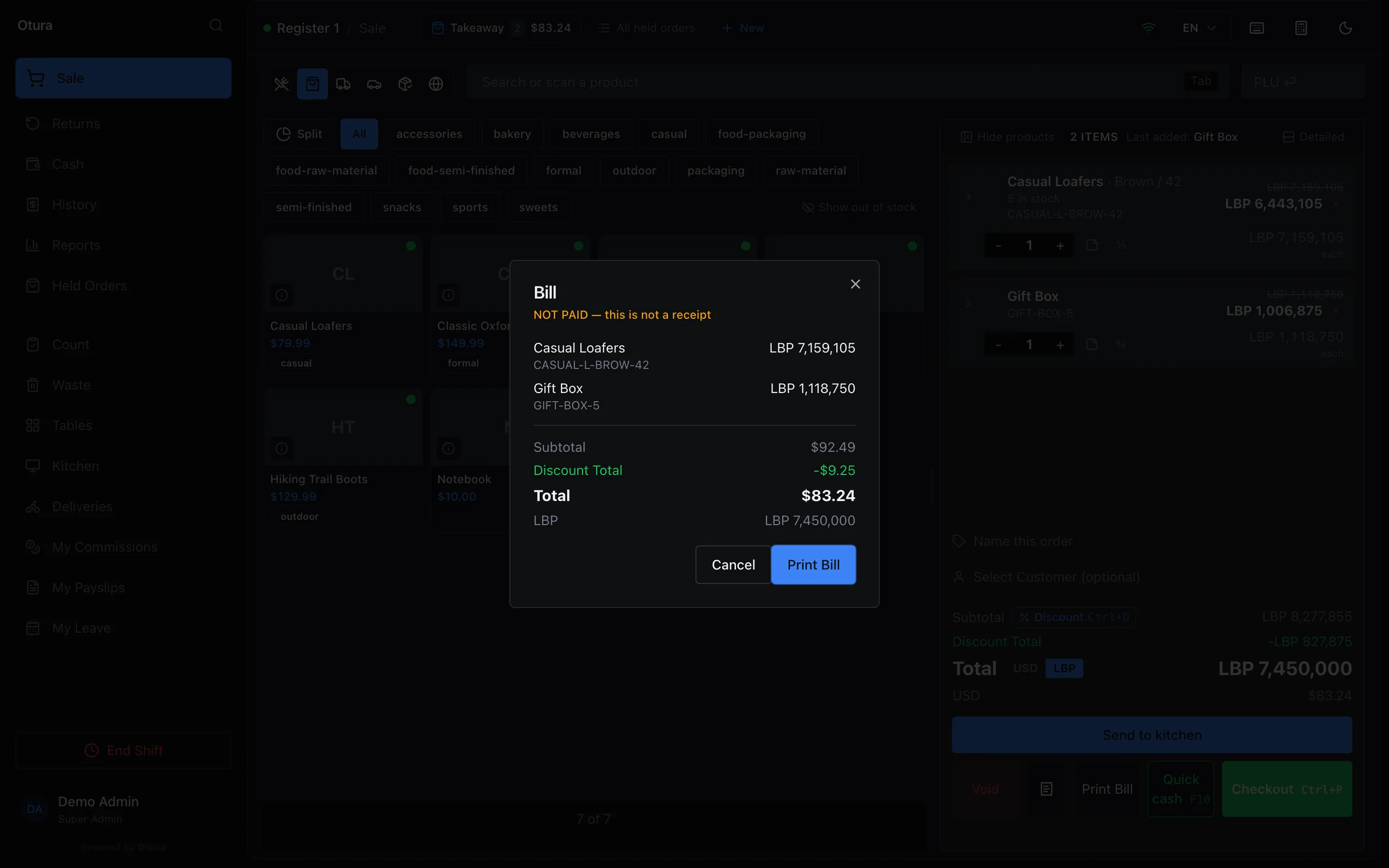
On a discounted order, the lines and the Subtotal are the full prices. A Discount Total row between the Subtotal and the Total shows how much the discounts take off, so the bill adds up. For example, lines adding up to $92.49 show Discount Total -$9.25 and a Total of $83.24. The printed bill has the discount too, the way a receipt does.
The lira total
Where a business sells in dollars and takes lira, the cart, the bill, the payment screen and the receipt all show the same lira total: the dollar total at the order's rate, rounded to the shop's cash step, because that is the amount a customer can pay in notes. The step is set under Cash rounding in SettingsPayment methods. It starts as the nearest 5,000.
For example, five gift boxes at $12.50 are $62.50. At 89,500 LBP per dollar that is exactly LBP 5,593,750. The cart, the bill, the payment screen and the receipt all say LBP 5,595,000. The receipt also prints the rate (Rate: 1 USD = 89,500 LBP). A receipt printed again later rounds with the cash step in force when it is printed again, not the one of the day of the sale (see Receipt settings).
When the exchange rate changes during an order
An open order's lira follows today's rate. If the owner changes the rate while an order is open, the next thing done with the order (a line added, the screen refreshed, the payment) works its lira out again at the new rate. The dollar total does not change. The till says so once: Rate updated: this order was quoted at … LBP/$, now …
If the rate changes while the payment screen is open, a payment with lira in it is refused, and the message names both rates, for example The exchange rate changed from 89,500 to 90,000 LBP/$ while this payment was open. The lira due has been re-quoted: take the payment again. The sale is not recorded. A payment in dollars only goes through, because the dollar total did not move.
Where it prints
In the Otura desktop app with a printer on the Receipt Printer role, receipts and bills print on that printer. Anywhere else, including the till in a web browser, printing opens the browser's print window, so the person at the till chooses the printer there. See Printers.